Editor’s note: I presented a talk on June 27, 2011 at HighEdWeb Rochester which covers this topic in more depth and is based on some of my more recent thinking on this topic… though the content below is still very much relevant.

Two weeks ago  I attended the Design for Mobile conference in Chicago. My brain is still recovering from so much great content in so little time. This article is based on one of the big ideas I took away from the conference.

To me, the mobile web versus native app debate is dead. I think that should be the case for most large, established organizations trying to deliver mobile services to users1. The question is no longer ”Which, between mobile web or native, do we develop for?” The question now is ”How do we develop an architecture to handle both mobile web and native now and then the mobile devices of the future?” With the latter question in mind let me suggest a progressive mobile strategy.

What I Mean by “Progressive Mobile Strategy”

A progressive mobile strategy, much like progressive enhancement on which it is based, is a strategy focused on offering very basic interfaces to information from which other services can pull and then progressively create more complex interactions based on device type and device reach. The mobile market (both OS and device) is moving too fast to pick a winner to focus your energies on so the best you can do is try to prepare for all eventualities and develop “broadest reach” solutions.

I feel a proper progressive mobile strategy would see the following implementation path:
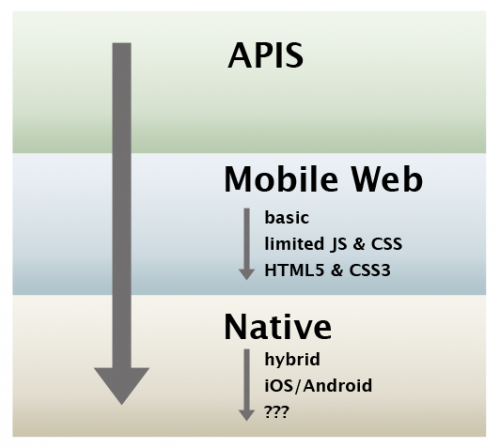
Within the mobile web and native categories you’d also want to implement progressive solutions. What’s the point of focusing on mobile web if you’re only going to create the yummy HTML5 & CSS3 experience that only works on the absolutely bleeding edge devices? Also, you don’t necessarily need to have the APIs in place before executing your mobile solutions. You just have to realize that, to be able to properly extend and make your life easier in the future, APIs are going to have to be created at some point. Trust me, it’s awkward if you have to go back and retrofit.

APIs: Create Once, Publish Everywhere

The most important element in creating an architecture that will handle the future of mobile is to create as many APIs into your data as possible. Many of the web applications that we’re currently developing in University Relations – Web at West Virginia University utilize an API as the data source for all the various views be they desktop web, mobile web, or our native iOS app. The notion of strongly separating logic from presentation has been around for a long while now so I’m not proposing anything revolutionary here (XML-RPC/SOAP anyone?). For us, this separation has been of little interest as we weren’t integrating systems or offering any other views other than desktop web. As we’ve moved into mobile we’ve realized it’s going to become more and more important to implement this clear separation.

A good example of this type of separation is NPR’s content management pipeline. Focus on the “presentation layer” to get an idea of all the various things they’re attempting to support.
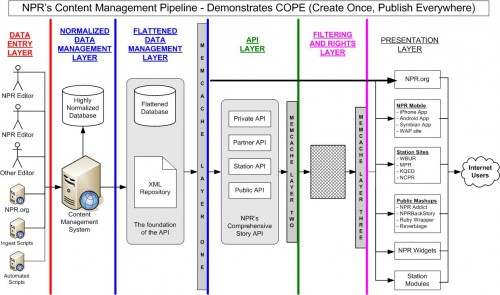
From APIs I think mobile web is the next logical step in implementing a progressive mobile strategy…

Why Mobile Web Before Native?

To paraphrase Jason Grigsby2 (@grigs):

Not every mobile device will have your app on it but every mobile device will have a browser.

This, to me, is the biggest selling point for going mobile web first. From the latest smartphones to several-years-old feature phones most devices are now internet-capable. Do all types of devices use the mobile web equally? No, but that doesn’t mean you shouldn’t provide for them or ignore the reach of the mobile web. It’s this long reach of mobile web that makes it the obvious first step in deploying a mobile solution. Mobile web allows you to write once for many devices.

But, while I maintain a mobile web-focused framework, mobile web is not the be all and end all for mobile development. Native offers an institution the possibility of building a better, more focused experience for a user compared to mobile web (not to mention the small issue of mobile web and discoverability). I do think native apps take a whole different skill set from web and mobile web development. That is why I’m not sure they’re the best fit for institutions unless you’re pretty positive you’ll be holding onto the talent you’ll need to continue to build and develop these solutions. Native does offer some interesting possibilities.

Future Proof?

Hopefully by implementing a progressive mobile strategy you’re future proofing your mobile development efforts. As new technology comes online you should be able to react more quickly. This strategy is not only for mobile but should allow you to easily develop for other outlets like digital signage or upcoming TV-based interfaces. But we’ll see. A lot can change in six months.

Addendum: API First

I didn’t realize that Josh Clark (@globalmoxie) touched on this in a recent presentation entitled, Going Native: The Anthropology of Mobile Apps. Just skip to slide #44 and make sure you check out the notes below the slides. API First is a play on Mobile First which is championed by Luke Wroblewski (@lukew). The cross-pollination of ideas out of Design for Mobile is pretty cool to see. I’ll have to try to make it back next year.

1 – there is a great example of a company using a progressive mobile strategy in the Why Best Loves Mobile video.

2 – check out Jason’s Design for Mobile 2010 presentation, ”Get me a Mobile Strategy or You’re FIRED!” too.
This article was posted

One of the challenges in developing mobile websites is finding good examples. Over at eduStyle (@edustyle) Stewart Foss (@stewartfoss) has made things a bit easier for designers and developers by launching a mobile design gallery focused on higher ed. If you’re not familiar with eduStyle the basic premise is that it catalogs screenshots of sites, now including mobile sites, that users then can comment on and critique. So it’s a great way to gather ideas and narrow down the search for finding the mobile design that’s going to work best for your institution based on feedback from other higher ed professionals.

If you already have a higher ed mobile site I would strongly encourage you to submit a screenshot of your site to the mobile design gallery. Not only will you be helping others out (and maybe getting a few five star ratings in the process, that never hurts the ego) but one of the cooler features of eduStyle is the ability to track redesigns so it’d be great to see, graphically, the evolution of mobile design in higher ed.

This new mobile design gallery, coupled with the Higher Ed Mobile Directory, is making it much easier to get an idea of what is out there in higher ed mobile. Kudos to Stewart to creating what I expect will be a great resource for folks.

This article was posted

We have an upcoming project (now launched) where we wanted to show the latest, greatest Facebook fan and Twitter follower counts for our official presences on those services. I put together some really simple JavaScript that does just that and I’m sure others could use it as well. As always the code requires jQuery. You should be able to copy the example code into an empty text file, swap in your the usernames of your official accounts, and go from there. If you have any questions about the code please drop me a line in the comments. By the way, there is no error handling on the JSONP requests simply because I guess jQuery has decided JSONP requests won’t generate any.

So check out the code on gist.github. Feel free to fork it, comment on it, modify it, or whatever. You can also see the code in action on the Connect with WVU website.

Updated October 6, 2010: Added support to automatically insert commas. The counts now look a lot better.

Updated November 16, 2010: A user posted a simple implementation of this concept written in PHP.

Updated December 29, 2010: Fixed a bug in the Facebook fan count because Facebook changed the name of the count element from ‘fan_count’ to ‘likes’. Latest, greatest code.

This article was posted

This video from Best Buy (debuted at the National Retail Federation’s 2010 Retail Innovation & Marketing Conference) really sums up what getting into mobile means for  a company or institution. It also shows why a broad progressive mobile strategy is so important for delivering successful mobile solutions. I’m struggling with my write-up for what I mean by a progressive mobile strategy but hopefully this video offers some hints.

Note: Thanks to Jason Grigsby (@grigs) for pointing out the video in his last minute Design for Mobile 2010 presentation, ”Get me a Mobile Strategy or You’re FIRED!*” *

This article was posted

Now that we are a little over a year into having a central mobile website for West Virginia University I decided it’d be a good time to share some numbers. Hopefully the charts showing the performance over the last year prove informative as you look to implement mobile solutions on your campus.

As a quick refresher… we launched our mobile site, WVU Mobile Web, in late August 2009. We originally used the MIT Mobile Web framework and it took a few weeks to get the framework customized for WVU. We have since documented and re-released a generic version of the framework as Mobile Web OSP which included a second version in May 2010. Our mobile site acts as a portal into various non-academic services like our directory, campus map, and events calendar. It is definitely a product focused on current students as well as on-campus faculty and stuff. At the same time we launched our mobile site we also launched a student-developed iPhone app called iWVU. And just so you can judge scale and possibly performance for your campus WVU has about 32,000 students.

Overall Numbers

So some interesting, high-level points from the last year:

  • 832,615 total page views (again for scale, our home page did a hair over 10 million page views during that period)
  • 70% of users tracked by Google Analytics returned more than once
  • Users averaged 2.5 pages per visit
  • Users visited from 134 countries and all 50 states

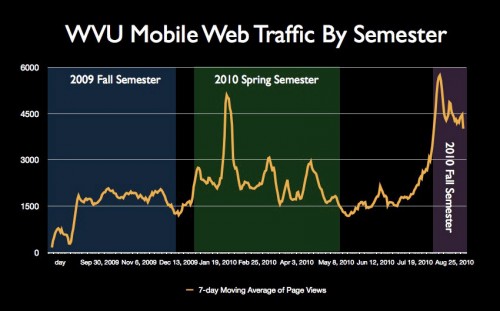
WVU Mobile Web Traffic by Semester

The following is a general trend of traffic broken out by semester:

  • 2009 Fall Semester – 1,536 avg. page views per day with a max. of 2,565
  • 2010 Spring Semester – 2,385 avg. page views per day with a max. of 10,463
  • 2010 Fall Semester (so far!) – 4,690 avg. page views with a max. of 7,796

Between 2010 Spring and 2010 Fall we saw a 100% increase in usage. Between 2009 Fall and 2010 Fall we’ve seen a 200%+ increase in usage. There’s a very clear trend that mobile devices and the mobile web are being used more and more on campus. Honestly I find the year-to-year increase pretty staggering for something that isn’t getting a lot of advertising. Especially when you consider we’ve done nothing for the start of this school year and we’ve had the most use so far.

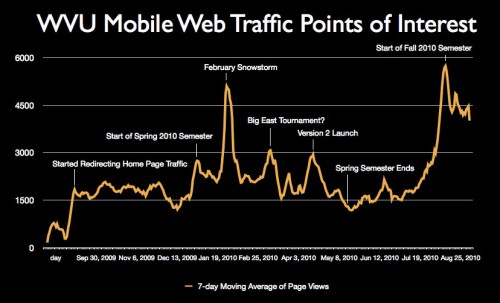
Some Points of Interest

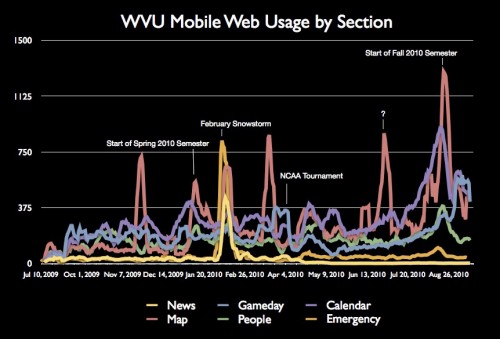
There are some pretty obvious spikes in the data above. The following chart attempts to explain the obvious highlights (click on it for a larger version):

There are obviously two really big points of interest. The first is the big spike we have about halfway through the year in February 2010. The February 2010 snowstorm generated 10,000+ page views in one day so the spike is actually even more dramatic than this particular chart shows [more in-depth mobile usage details]. The second point of interest is the obvious increase in usage to start the Fall 2010 semester. My fingers are crossed that this trend continues for the rest of the semester. I think this is due to their being more Android devices on campus but I’m not positive. At the moment I feel like we’re reacting a bit to what’s happening and sort of guessing at reasons.

Traffic by Select Sections

The following are the top six sections for WVU Mobile Web. The most consistent performer for us so far has been the calendar section. I think that’s partially due to interesting content as well as the number of screens a user has to dig through to get to that content. Mobile web usage is all about context and I think the top sections really reflect this. Campus map spikes out at very specific times (there are three spikes I don’t really understand though). The news section flatlines because, after the launch of version 2, we redirected all mobile requests for news directly to the mobile version of WVUToday.

Just so you know these are the percentages of traffic by these top six sections:

  • 14% – Calendar
  • 13% – Campus Map
  • 9% – Gameday
  • 7% – People
  • 3% – Emergency
  • 1% – News

Traffic By Device Family

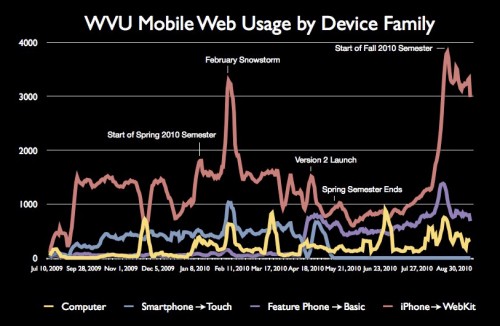
WVU Mobile Web uses device detection to display the appropriate templates per device. This chart is not the most accurate because in April 2010 we actually switched up how we categorized devices. For example, before April 2010 Android was shoved into the “Smartphone” category. After April 2010 it’s in the “WebKit” category. We actually stopped serving the “Smartphone” templates in April 2010 hence why that grouping flat lines (there was a sort transition period to address a bug though). iPhone/WebKit obviously trounced the other device families with a huge separation to start Fall 2010.

Conclusion

Simply put, mobile web is a viable platform for delivering campus content. Note that this is at a school that also has an iPhone app so it’s not like mobile web is the only game in town here. The rate of increase in mobile web usage semester-to-semester (200%+) is pretty incredible to me. With a lot of that powered by Android (roughly 30% of the page views this semester) it shows that other platforms are starting to compete effectively with the iPhone and that mobile web is a good solution for delivering to as many devices as possible. Mobile is here… the only question is when are you going to get onboard and deliver you own solution?

This article was posted