The fine folks at the University of Florida, led by Bruce Floyd (@brucefloyd), are currently conducting a survey regarding higher education mobile applications and the mobile web. I’ve already submitted info for our school but I’m sure they could use a cross-section of opinions/experiences. Should take about 10 minutes or so. If you’ve developed a mobile app or website for your school please take a moment to help them out. Check out the form on Google Docs.
Interested in using an open source framework to develop your school’s mobile presence but not thrilled about using PHP? Feel more comfortable with Python? Then the Molly Project might be right for you.
The Molly Project
The Molly Project, developed by University of Oxford for Mobile Oxford and and now joined by Oxford Brookes University, is open sourced under the terms of the Academic Free License v3.0. It’s built on-top of Django. I’m not much of a Python guy so I can’t get too much into the technical programming details but the list of available features is definitely compelling:
LDAP Support for directory searches
Z39.50 protocol support so it can interface with library information systems
OPML feeds for serving up podcasts
OpenStreetMap support for creating a mobile campus map
RSS support for displaying news & events
Google Search Appliance search
WebAuth and OAuth consumer authentication
The one feature that really interests me, though we don’t have it here at West Virginia University, is the integration with Sakai. It currently supports access to the sign-up, evaluations and polls tools.
Like Mobile Web OSP Molly uses device detection to adapt the look & feel of the page to match a phone’s capabilities. This means that you can deliver your information to the largest audience possible.
If you’re into mobile and you’re not following Bryan Rieger (@bryanrieger) of Yiibu on Twitter get on it. Bryan recently presented at Over The Air and delivered another stunner entitled ”Rethinking the Mobile Web”. I absolutely love his style of slide decks. They’re completely understandable to anyone who didn’t get a chance to see him talk. They’re just really well crafted. I really wish he was going to be at Design for Mobile next week but, alas, he will not be there. So here are two presentations by Bryan that I really think you should check out:
Recently we’ve been dealing with a temperamental system. We set-up a few monitoring tools to let us know when the system was throwing a tantrum but emails from the system never seemed fast enough. In order to make sure that we got notifications as fast as possible we decided to have them also post to Twitter so Twitter could send SMS messages to our mobile devices. While we’ve only had it fire off once so far (knock on wood)it was great to be able to troubleshoot within seconds of an issue being found. We also rolled this feature out for notifications for an on-campus transportation system.
So how can you set-up Twitter to send you notifications for your system? Well, if you feel comfortable with PHP here’s how:
1. Set-up a New Twitter Account
This should be pretty self-explanatory. Go to http://twitter.com/ and click the big “sign-up” button.
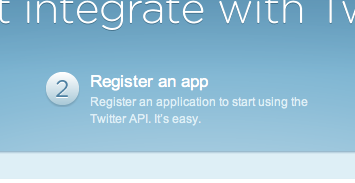
2. Register Your App
Go to http://dev.twitter.com/ while you’re logged into your new Twitter account. Click on the “Register an App” link.
Then just fill out the form you’re shown. Some tips:
Your “Application Website” can just be your school’s home page. Since no one other than you is going to use the app you don’t have to provide anything real here.
You can leave “Callback URL” blank since your app won’t need to authenticate users.
For my app I chose “Read & Write” but I have no idea if “write” is really needed. Doesn’t hurt to set that.
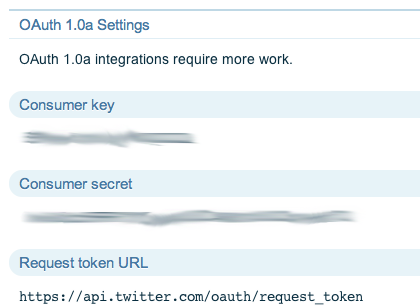
3. Copy the OAuth Settings
As of August 31, 2010 Twitter is no longer allowing basic authentication. All apps are now required to use OAuth. You will need to copy down the consumer key and consumer secret to use in your app.
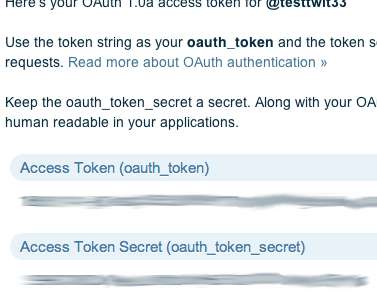
4. Copy the OAuth Access Tokens
This part caused me confusion at first. I had a tough time finding them. You’ll need to click the “My Access Token” link in the menu bar on the right. Then you will need to copy down the access token and access token secret.
5. Download the Twitter with OAuth PHP class
Since Twitter is now OAuth-only you’ll need to make sure you have a PHP class that supports OAuth. In my recent project I used Tijs Verkoyen’s Twitter with OAuth PHP class. I found it really easy to implement and well-documented.
Special note: if your install of PHP is pre-5.2 you’ll have to download the PEAR JSON library and jsonwrapper. Twitter returns data in JSON and the Twitter with OAuth PHP class uses PHP 5.2+’s built-in json_decode() function. Having the PEAR JSON library & jsonwrapper will keep the Twitter with OAuth PHP class from blowing up. It will not allow you to access the data from Twitter though. Since we’re only posting to and not reading from Twitter this shouldn’t be a problem.
6. Set-up Your PHP Script to Update Your Status
Here is the code you can include in your app to update the Twitter status of the user you created earlier in the process.
# require the Twitter with OAuth PHP Class<br />
require("twitter.php");
# replace as appropriate based on what you copied down earlier<br />
$consumer_key = '';<br />
$consumer_secret = '';<br />
$oauth_token = '';<br />
$oauth_token_secret = '';
# update the Twitter status with $your_message<br />
$twitter = new Twitter($consumer_key, $consumer_secret);<br />
$twitter->setOAuthToken($oauth_token);<br />
$twitter->setOAuthTokenSecret($oauth_token_secret);<br />
$twitter->statusesUpdate($your_message);
If, like us, your message could be the same many times in a row you’ll need to add something unique, like a date, to each message to make sure that Twitter doesn’t see it as a duplicate and reject the message. For our campus transportation notifications system Twitter refused to update the status even if the message only happened to match one message posted in the last few hours.
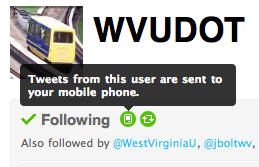
7. Make sure Twitter is Sending the Updates to Your Mobile Device
And last, but definitely not least, make sure that Twitter is sending the updates that your new Twitter user posts to your mobile device. There is a handy icon on the new Twitter users account you’ll have to click.
So with that you should have enabled your PHP application to post to Twitter so you can get notifications of important changes via SMS.
I recently added five sites to the Higher Ed Mobile Directory bringing the directory to a total of 84 sites. This article is one part of a five part series showing off these new sites. Do you have a mobile site for your school that you want to feature on this blog and/or have listed in the directory? Please drop me a line.
Harvard University – m.harvard.edu
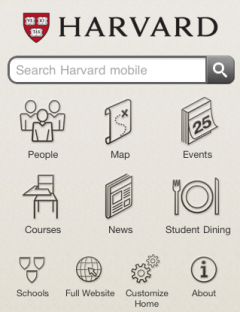
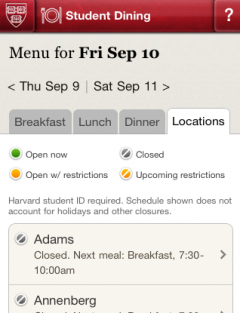
The folks who brought you the original MIT Mobile Web project have now spun off there own company, Modo Labs. Their first client looks to be Harvard University. Version 2 of MIT Mobile Framework (which I hope to feature once I get the all clear) now powers the Harvard University Mobile Internet. There’s a nice post on the Harvard Gazette site detailing the launch. Two screenshots:
The main focus of the Harvard mobile site is search. The search feature actually searches across multiple data sources and then shows you a nicely organized set of results. This is known as federated search (honestly, I had to look it up). Currently the following sources are searched by the Harvard mobile search feature: campus directory, campus map, events calendar, courses, and news. It really has to be experienced to fully appreciate how cool it is so try it out. I have to say that this is one of the more intriguing features of the upcoming release of the new version of the MIT Mobile Framework. Originally when I had heard “federated search” I was “meh” because I didn’t really get what the data sources would be but seeing it in action… pretty freaking cool and I expect it to be copied in other higher ed mobile sites.
The other section I really like is the dining menus section. We’re implementing something similar so it’s nice to get a good design pattern. But the section also highlights a problem I have with the MIT Mobile Framework. Their appears to be a serious lack of integration of sections with the campus map. I also think the campus map itself is a bit weak as a section but I’m partial to Google Maps (though to be fair, the JavaScript to power Google Maps is heavy on a mobile connection). Not only could the dining menus section benefit from the campus map link but so could the calendar and directory sections (ed. note: I did limited searches and didn’t see any comprehensive links to the campus map but if their are feel free to correct me).
One of the great challenges facing higher ed in the mobile space is linking our information like calendar events, directory listings, and news articles with locations. While the federated search exhibited in the Harvard site is very cool just imagine one based on GPS that answers the question ”What is near me?” To me that should be one of the real drivers for us as we further develop our mobile frameworks. It’ll take a lot of coordination across an entire campus but I think it’s necessary to make our offerings compelling and useful long-term.