The second post in my series on design patterns of mobile sites in higher ed.
Elon University
Elon University has a very nice and simple mobile site. The one feature that stands out to me is the “Map Tour.” Selecting it presents a little description (the text is a wee small though) and then clicking through that it looks like it attempts to place you on campus based on your current location. Obviously I’m not close enough to campus for it to properly work. The “Map Tour” shows a use case for campus mobile that I’d like to see WVU and others take advantage of. Providing info to visitors in an unfamiliar setting is a great use of mobile. I hope the geolocation API (allows a mobile site to access a device’s GPS unit) is just the tip of the iceberg for access to a mobile device hardware capabilities.
Southeast Missouri State University
Southeast Missouri State University built there mobile site with Mobile Web OSP 1.0. They’ve taken the original grey layout and seriously spruced it up. It’s great to see what people can do with a common base of code to make a product their own. I just wish I had the weather section updated for Mobile Web OSP 2.0 so I could use it too.
Soccer PSA
I’m a huge soccer fan (anyone who follows me on twitter knows this). Just a reminder that the US plays England to open their World Cup group play tomorrow, Saturday June 12th. Coverage starts at 1.30 pm EST on ABC. Going to be a huge match.
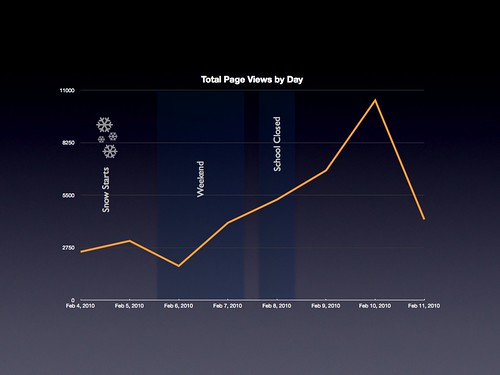
The winter of 2009-2010 was very rough here in Morgantown, WV as it was in much of the mid-Atlantic and Northeast. At one point in early February (4-11 to be exact) it was so bad school was closed. The following is a review of the usage of the WVU Mobile Web during that time period. Overall there was a fourfold increase in traffic to the system. While we had to manually update the emergency information we made sure it was as up-to-date as any of the other outlets on campus. I think this shows that there is a need for an institution to deploy mobile products to help communicate information during a crisis.
Prior to the snowstorm WVU Mobile Web would usually average around 2,700 page views on a weekday. Starting February 7 WVU Mobile Web set records for total page views every day until February 10 when it reached a peak of 10,400 page views. It seems that the more uncertainty their was regarding if school would be open the greater the page views. WVU Mobile Web really became an important outlet in letting users know what was going on at the school. The last data point, February 11, is still well above the average at 4,100 page views.
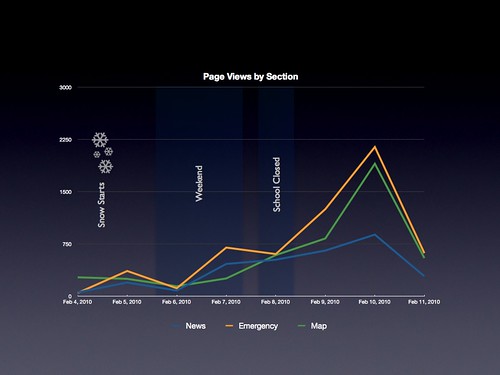
The record page views were partially driven by visits to two sections that normally don’t see much traffic, Emergency and News. Both sections, prior to the snowstorm, averaged 150 page views total per week. On February 10, the peak for visits, Emergency had 2,100+ page views and had had 5,200+ page views over the previous week. That’s 34 times the normal average for a week. News was similar if slightly lower. On the day of the peak it had 880+ page views and had 2,800+ page views over the previous week. Emergency was updated as weather alerts went out with the latest information regarding the status of school. News was updated with the regular RSS feed from WVUToday. Other sections continued along their normal average. The only other section to see a significant increase was Map. I’m still unsure why Map saw an increase.
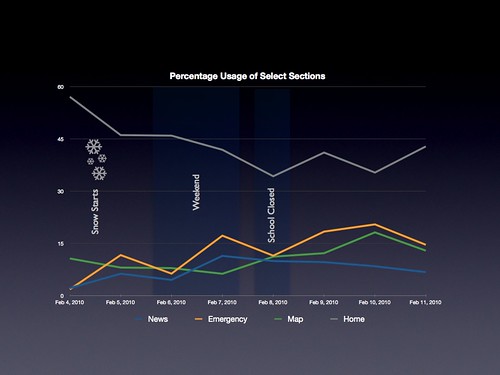
In order to gauge real use of WVU Mobile Web we need to look at how activity in each section, including the home page, relates the the total page views of the system. Our WiFi login home page is the WVU home page so when a user signs into the WiFi network from their iPod Touch they visit WVU Mobile Web automatically. They may leave the service immediately but they’ll count as a page view. If a user visits a section then they’ve had two visits, home and the section. So we know the system is really being used if the percentage of home page visits is 50% or less of the overall traffic. As you can see the percentage of home page visits was less than 50% for the entire event showing that the system wasn’t just acting as a landing page for WiFi logins.
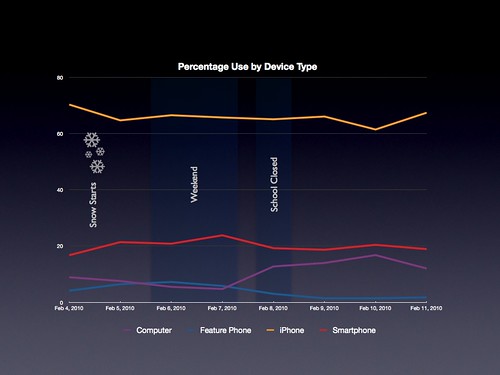
Finally, here’s a breakdown of use of WVU Mobile Web by device type as the snowstorm continued. The most interesting line is the purple one. While iPhone and Smartphone stay roughly the same over time their was a doubling, percentage-wise, of use by computers. It’s interesting that while we target WVU Mobile Web to mobile devices it is accessible, and was obviously used, by users at their desks. This may show that their is an untapped audience out there who may find the services Mobi provides useful. Feature Phone has the bump just because the total page views for the 6th are low so any visit by a Feature Phone is magnified in the percentages.
Their are two big challenges facing an institution attempting to implement a centralized mobile-friendly website a la the WVU Mobile Web. They are:
Getting access to content that can populate such a site and
Explaining to folks that such a service is even available
Content issues can get worked out and, while the type of content you have will definitely drive the future success of your mobile endeavour, at the end of the day if no one knows about your mobile site then it doesn’t matter how comprehensive your content is. Also, buy-in for getting new content will probably require or at least could benefit from some decent numbers traffic-wise. I don’t mean to wave off the topic of content entirely but I’m lazy and I want to focus only on discoverability with this post.
To me discoverability is the elephant in the room for mobile web. Not performance, hardware access, or payments… it’s discoverability. Discoverability is how easy it is for users to learn about your site. But you say, ”It’s on the web. Anyone can find it.” Some even call it a red herring. Sorry, mobile sites are still rare. Users don’t expect them. And users are slowly (quickly?) getting conditioned to look in one place when the need strikes for content on their mobile device, the app store. To make an analogy, to some people if a product isn’t sold at a Super Wal-Mart then it doesn’t exist. Until their is a similar centralized service for mobile web apps there’s going to be a lot of leg work out there for you to advertise and re-advertise your mobile site.
So what steps can you take to increase discoverability (and rediscoverability!) of your higher ed mobile site?
Redirects, redirects, and more redirects – redirect traffic from your home page, your WiFi login landing page, and the main pages of any services that are available in your mobile site (e.g. directory) to your mobile offering. Users with mobile devices are automatically going to go the sites they would normally visit on their desktops. Take advantage of this to push them to your optimized offering. We went from an average of 80 visits a day to 900 visits a day with the redirects. That’s an order of magnitude more traffic. Also, mobile users using search to find your main site will get the mobile version too.
Advertise Where Users Will Use Your Services – this ties into the notion of context. Users probably won’t think of/remember your service when they need it. If you have a mobile shuttle schedule service make sure you have advertising at the bus stops. Make the connection for them between your site and the information they want/need. This would be a perfect opportunity to use QR codes so that a user can launch your site quickly. We plan on using them with our digital signage this fall. I’ll also have a future post on how we used them in a marketing campaign this past spring.
Encourage Users to Bookmark – I’m not positive users know they can bookmark mobiles sites on their phones. In the case of the iPhone they can actually add a site to their homescreen just like an app. Talk about the opportunity for rediscoverability!
I’m sure their are other ways to increase discoverability of your site. You can make sure your site is on Taptu or Chomp. Their is always the trusty press release, the student portal or university intranet but, as always, try to focus on where and when your users are at when they have a need. It’s all about the context.
Postscript: Native Apps & Discoverability
I’m definitely a guy focused on mobile web. I think for an institution it offers the most bang for the buck in terms of delivering access across the largest possible number of handsets while leveraging skills that are already available. That said I’m not blind to the sexiness (especially from a PR angle), usefulness, and performance of native apps. Discoverability is one of the areas where a native app has a real advantage. Users understand where they have to go (an app store) to get content for the device. But there is an interesting hybrid option…
There is zero reason why you can’tdeliver your mobile website as a native app. For example, on the iPhone a native app could simply consist of a UIWebView pointed at your mobile site. So a native app delivered through the iPhone app store but pulling content from your mobile website. I put together an example native app wrapper if you want to check it out.