Another user email prompted this post so if you have a question feel free to drop me a line.

The following directions mirror how I have Mobile Web OSP set-up on my own Mac. It’s pretty straightforward to set-up.

Special Note: The default install of PHP on Mac OS X may not support short tags (e.g. <? ?>) wrapping PHP code and rather expect <?php ?>. Short tags are used quite a bit so you will want to turn short tags on. This is something I need to address in a future update to the system.

Downloading Mobile Web OSP

I’m not going to go into too much depth with this. Use the solution that best suits you. Just make sure you know where you installed it. You should also finish configuring the project at this time as well.

Setting Up m.test.edu

I like to set-up custom hostnames on my machine for my projects. It’s just easier for me to remember. Also, since all of our projects are delivered on their own subdomains I know all the paths and what not will work correctly. To add a custom hostname for your project do the following:

  1. Open “Terminal” (it’s in Applications > Utilities)
  2. Type: sudo pico /etc/hosts
  3. When prompted type in the password you log into your Mac with
  4. Add the following to the end of the file: 127.0.0.1 m.test.edu
  5. Type: control+x
  6. Type y to save the changes

You’ve just added the hostname m.test.edu to point at your local machine.

Configuring Apache

Now that you have a custom hostname you have to make sure that Apache will answer to the added hostname on your machine. To do so do the following:

  1. Open “Terminal”
  2. Type: sudo pico /etc/apache2/extra/httpd-vhosts.conf
  3. If prompted type in the password you log into your Mac with
  4. Add this gist to the end of the file. Make sure the path to the project for DocumentRoot and the Directory directive are correct.
  5. Type: control+x
  6. Type y to save the changes
  7. Type sudo apachectl restart to restart Apache
  8. Go to http://m.test.edu in your browser

So now you should be all set with a test instance of Mobile Web OSP answering to it’s own hostname on your Mac.
This article was posted

For those folks using jQTouch the big news this morning is that the company called ExtJS which maintains the ExtJS library has now taken over support for jQTouch (as well as Raphael, a vector graphics JS library) and renamed themselves Sencha. Their is also a new official maintainer for jQTouch in Jonathan Stark. I’ve been a fan of jQTouch for a bit and use it in Mobile Web OSP and WVU Mobile Web so this more official support is welcome. I had been wondering if the library had fallen a bit by the wayside and was set to be overtaken. Hopefully their’s an update from Jonathan soon on what this means from the library and where things are going (stable 1.0 soon, please?). I’m also curious if this means ExtJS rather than jQuery will power the library in the future. @senchainc and @jonathanstark on Twitter.

This article was posted

One of the toughest features to implement in the latest version of WVU Mobile Web was the maps feature for the jQTouch-enabled views for iPhone and Android. It looks good but it was a several week bear and the single most annoying thing I’ve put together related to jQTouch. With that in mind I’m trying to share my experience and code so others can more easily implement a similar feature.

On GitHub I now have a Google Maps v3 for jQTouch repository. It contains a very simple project that is an example of using Google Maps JavaScript API v3 with revision 133 of jQTouch and jQuery 1.4. I do not currently have this demo working with revision 148 of jQTouch. r148 is the absolute bleeding edge at the time of this writing. Some points to keep in mind:

  • r133 is not the beta version linked from the main jQTouch site. It was the edge release when i started on my project. If you’ve been working off the beta the only change I think you’ll have to make is to add a div with the ID of jqt around your divs. Refer to the project to see an example.
  • the project appears to handle rotation of the device after the map is loaded just fine. It does go a little wobbly if the device is rotated before the map is loaded. I still need to troubleshoot that.
  • the project assumes map “pages” will be loaded via AJAX. Our system dynamically generates many maps so that’s just how we’re dealing with it.
  • any “page” that will link to a map page needs to have the class clear-map-detail so the DOM is properly cleaned up after closing out the map. This reduces a “white flash” you could see as well as making future maps load properly.
  • the notransform class in jqtouch.css is actually from r143 of jQTouch. I had had something similar but went with David’s implementation from a later revision instead. This class makes the map draggable.

To see a demo of this all working check out WVU Mobile Web on your iPhone or Android device.

Some helpful links:

This article was posted

Late last week I received two questions relating to MIT Mobile Web and my fork of it, Mobile Web OSP. I figured it’d be good to address them publicly since my response may be of interest to others as well.

Why Did You Fork MIT Mobile Web?

I forked v0.9 of MIT Mobile Web for a few reasons:

  • it was an absolute bear to set-up & configure,
  • it was obviously written with only one institution in mind (which is fine) and had no real thought to customization, &
  • it had zero documentation

The original version of MIT Mobile Web (they’ve now released MIT Mobile Web v2.0 with some documentation) felt more like a code dump than an organized project that other higher education institutions could take advantage of. The original project didn’t even have a list of requirements. I spent a fair bit of time adding a global configuration, working to use resources like Google Maps to make the project more generic, and mucking with the module set-up so other schools might have a better base to work from. I then spent a lot of time writing up documentation so users might have a better understanding of what was going on. So what I thought I had at that point was a cleaned up, documented “upgrade” of MIT Mobile Web. I don’t think I really changed a lot of the core structure.

As we moved internally towards version 2 of Mobile Web OSP, especially with our addition of jQTouch and themes, I realized that I had moved from an “upgraded” version of MIT Mobile Web to a true fork of the project. It’s not exactly what I wanted but that’s what happened.

Are You Going to Merge Your Changes Back to the Original Project?

I don’t know. That’s the honest answer. There has been interest from myself and the maintainers of the MIT project to discuss the differences and how we can move forward together but that discussion hasn’t happened yet. As time moves on we keep moving further away from each other especially in how we’re implementing themes and templates. So there’s interest… I’m just not sure if we haven’t already moved past where we can easily merge back into one project. We’ve both already moved onto version 2 of our respective codebases.

More Forks…

One interesting thing that I’ve found with this project is that any school using a framework, be it MIT’s code or Mobile Web OSP, will essentially create a fork. Each school, their needs, and access to content is so unique that I have a feeling that a lot of schools will go crazy customizing a framework. At least their are two good ones to start from.

This article was posted

Augmented reality seems to be the hot upcoming mobile technology. So what is augmented reality? You see it every Sunday in the fall. The yellow first down line shown during football games is a perfect example of how one can use computer-generated graphics to overlay relevant information on a picture/video to enhance it. But a video example might be easier to grasp (turn down your volume first!):

WVU’s Augmented Reality Campus Map

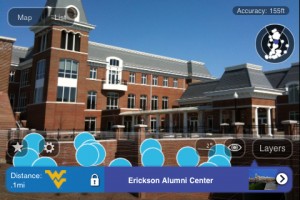
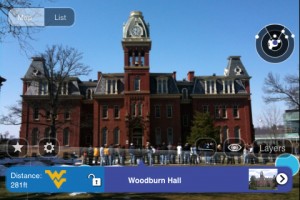
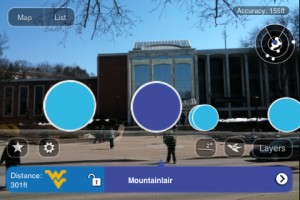
During the winter break of 2009 a co-worker of mine at West Virginia University used Layar to build an augmented reality campus map. Layar is an interesting product that can help you to easily bring location-based augmented reality to your campus for iPhone OS and Android-based devices. It was straightforward and only took a few days with debugging to get a test set-up. We have published the layer in the Layar store but it’s obviously only useful to those folks who are here in Morgantown, WV. Some screenshots (this is pre-Layar 3.5 so the interface may be different now):

Cool but…

Location-based augmented reality isn’t quite there yet. It makes for a very cool demo but doesn’t seem to be something that’s really useful. It could get there at some point but the limiting factor at the moment, to me, is the interface. Holding up a device at roughly eye-level is just impractical and awkward. Because of the small screensizes and distance their is a real lack of info you can quickly show. The reverse is true as well as can be seen in the screenshots above. There can be information overload with the dense layering of objects. AR will be useful either when you can hold it at hip level and get arrows on the ground to show you the way to your destination or you can get glasses that have the AR functionality built-in so the effective screensize is huge.

Another Kind of Augmented Reality

Ok, so I’ve talked about a very specific type of augmented reality, location-based AR. That’s obviously the mobile-friendly version but you can also use the webcam on your desktop for augmented reality. Here’s a video of of the USPS Priority Mail Virtual Box Simulator (try it for real too):

I think in the near term there are a lot more uses for this type of AR than the location-based AR. I’m sure people could think of a few. Perhaps virtual balloons when you open your acceptance letter? If you’re a Flash person you can always check out the FlarToolkit.

This article was posted