The device detection has been updated to recognize Opera Mobile.
The device detection has been updated so that deprecation errors aren’t thrown in PHP 5.3+. All of the references to eregi() should have been replaced with preg_match().
The input text color for the default theme is now black for easier readability.
The big fix was to the category drop-down in the map section. That should now work and switch the view based on the selected option.
If you’ve found an issue or bug please let me know so that I can fix it for others.
This post isn’t really related to mobile. I will be updating my code in Mobile Web OSP to use a modified version of the following code to track outbound traffic though. My current code tracks outbound clicks as pageviews rather than the preferred events.
So the fallout from the XKCD cartoon University Website continues with a post from Inside Higher Ed entitled Web Re(design). Fun quotes, insights, and comments abound but the following paragraph really struck me:
One problem with using nationwide data or broad-based best practices is that just as many institutions are different, the audiences of different institutions may want different things. And parsing those demographics effectively requires self-study more than adhering to broad principles, say several consultants who take contracts for such work. Still, even professionals sometimes struggle to figure out the percentages of how home page audiences divide up so they can probe their desires, says Stephanie Geyer, associate vice president for Web strategy at Noel-Levitz. “I suspect that would be hard data to come by reliably,” Geyer says. “You could set up a survey on the site, but you’re not necessarily going to get a reliable sample at any given time.”
I think you can get a start on gathering that audience data by tracking outbound traffic. While I don’t think tracking outbound traffic is the be all and end all to figuring out the “desires of your audiences” (@paulprewittkindly set me straight on this point) I do think it will give you interesting insight into what users are actually using on your site and, again, will give you some data to back that insight up. How do you do it? Just use the Google Analytics Event Tracking feature. It’s unobtrusive and it’ll capture data on every user that uses the page and not just those select folks you can push a survey too.
I’ve posted some code that should allow you to easily take advantage of the Event Tracking feature. Feel free to copy it, fork it or contribute back if you want. All you need to do is copy and paste it into the head portion of your pages. Just make sure to update the account number. It may not be perfect though. It works in my testing but triple-check it before adding it to your production site.
Some more details regarding the code:
It’s using the latest, greatest Google Analytics set-up so no guarantee it will work with older versions. If you’re interested in tracking outbound traffic but you’re stuck with an older version of Google Analytics check out Nick DeNardis’ (@nickdenardis) post on EduGuru, Tracking outgoing clicks with Google Analytics. It tracks outbound links as pageviews though so be aware of that. Nick does provide a good workaround though.
It requires jQuery. If you’re already using jQuery then great. If not… think long and hard about if you want to include jQuery just for this feature. I’m sure this code could be rewritten to remove the jQuery requirement. Unfortunately for you I’m lazy and I don’t feel like doing it as this code serves my needs just fine.
It’ll track all links that have http or https in them auto-magically. It will ignore links though that have an http in them but link to the same hostname. So if you need to track those types of links (for example, you have a link to a sub-site on the same hostname) you can add the attribute data-ga to your link. For example, to link to our example sub-site you’d do the following: <a href="http://www.dmolsen.edu/subsite/" data-ga="outgoing">Visit Sub-site</a>
Your HTML will most likely no longer validate because of the extra attributes in your href tags.
But the whole point of the XKCD comic and the Inside Higher Ed post was about audiences and gathering data related to them, right? How does tracking outbound traffic clearly give you information on use by audience? There’s an option available in my code (not required!) that allows you to track the audience as well as the location of a link. To do so you’ll need to add the attribute data-aud with a consistent value for your audiences to your outbound href tags that you want to tag by audience. For example, this link:
will record in the Event Tracker as “Outbound Traffic – Prospects” with the link http://apply.dmolsen.edu/. That way you can see which audience the outbound link was for and where they went. You can also mix audiences if you like. For example the audience could be “Prospects & Current Students” so you can see what outbound links are related to both. This creates a separate category in the Events listing though as opposed to adding an event to two separate categories. I wouldn’t go too crazy coming up with very specific audiences or mixing audiences as I think you’ll dilute the results a bit.
Hopefully this gives you a chance to get some data on how your home page is being used as a portal and who might be using it.
I guess I’m not as up on the latest buzz in the web world as I thought I was. Back at the end of May Ethan Marcotte (@beep) posted an article on A List Apart entitled Responsive Web Design. The core position of the article is that by using the media query tag you can provide the appropriate CSS markup for any type of device, especially mobile devices. For example, media="print" would provide a particular stylesheet for the page when a user prints vs media="screen" which provides a stylesheet for users on desktops. Pretty old school, standard stuff. The trick is that in the CSS3 specification a developer can define a particular stylesheet based not only on media type but also on device attribues like max-device-width which is where the whole “we can serve a mobile-specific stylesheet!” thing comes into play.
Does responsive web design offer an interesting and maybe easier way forward for implementing mobile web sites? Yes. Does that mean it’s a good idea? No.
Fool’s Gold
When I talk to developers who are about to embark on their very first mobile design they often want to just use CSS. It seems like the perfect solution. One set of content with multiple look and feels all without the aid of multiple templates or a CMS. A plain old win/win. Ignoring the significant context issues I’ve always cautioned these developers on technical grounds because they’ll still be throwing most/all the same media down the pipe at the mobile device even if it’s ostensibly hidden to the end user. Jason Grigsby (@grigs) sums up the issue from a technical perspective in his article CSS Media Query for Mobile is Fool’s Gold:
Ferreting out the problems with CSS media queries for mobile devices is easy if you look at what media queries purportedly promise:
All you need to do to transform your desktop web design into something optimized for devices with smaller screens, less powerful CPUs, and slower network connections is to add more code.
The idea of adding more code—adding more to download—in order to optimize for mobile should be the first clue that this isn’t a good solution.
Jason then does a great job of explaining all the technical issues (in some serious depth too) that make CSS media query a failure from a mobile development standpoint. It’s always something I sort of assumed but it’s nice to have numbers to back up my argument for the future.
Note: Jason has also offered up follow-up article More on CSS Media Queries that is worth reading. He attempts to take a softer position on them.
And to be fair to Ethan he does offer the following note that touches on context towards the end of his original post:
That’s not to say there isn’t a business case for separate sites geared toward specific devices; for example, if the user goals for your mobile site are more limited in scope than its desktop equivalent, then serving different content to each might be the best approach.
Proper web design in general should have a focus on context and use cases. But context is especially important in mobile. Does that mean mobile is going to be that much more work for you as the developer? Yup. Are you clients and/or users going to get a much better product though? Hell yeah.
Jason quotes Brian Fling towards the end of his article and I think it sums up context and the reason to do it nicely:
Create a product, don’t re-imagine one for small screens. Great mobile products are created, never ported.
Last week there was a nice post on QR codes on the Brand Manager’s Notebook by Ineke Caycedo. It gives a good introduction for the tech behind QR codes (there’s also a great video from Google showing their QR code-based “Favorite Places” initiative in action) so I’m not going to cover that here. The salient points to keep in mind is that they’re easy to generate and free. What I do want to talk about is how we’ve used them in a campaign at West Virginia University. We’ve actually used them twice but I only have examples of the material for one particular campaign. We will be using QR codes on campus this fall to help push users to WVU’s mobile site.
Big East Tournament Campaign
During the 2010 Big East Tournament we had a campaign that had the goal of publicizing our news site, WVUToday, and its redesigned logo to alumni and fans. The campaign centered around words that exemplified what it meant to be a Mountaineer. We had an internal team of about eight people who took the campaign from concept to delivery in about three and a half weeks. That includes print, web, and video.
The QR Code
We used the Google Charts API to create our QR code (the QR code to the right is generated this way and goes straight to the mobile site for this campaign). Another, probably easier source is the Kaywa QR code generator. I use quiQR on my iPhone as my reader of choice but there are other options available as well.
The Pieces for the Campaign
Their was a business card (shown, not actual size) and a nearly identical tent card for display at the event. One thing to keep in mind when testing these kinds of pieces is that devices lacking in a macro mode for their camera (like the iPhone 3G) need bigger QR codes to be able to properly read them. Our business card was the smallest version of the QR code my iPhone 3G could read.
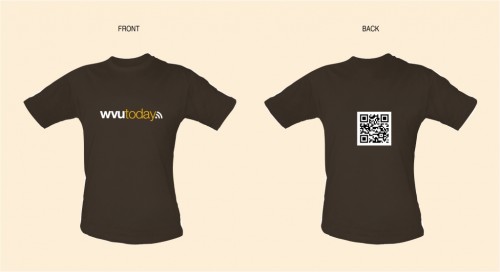
There were a few t-shirts printed up that had the QR code on it and student volunteers got to wear them around New York City and at the event (luckily I got a leftover).
There was also a video for display at the event though it didn’t have a QR code associated with it. That’s because we didn’t feel that there would be enough time to show a QR code and have users grab a picture of it before the video ended. I just think it’s one of the best pieces to come out of our Video Productions group so I’m sharing it anyway. I think it also helps reinforce how tight the campaign was from a look & feel standpoint.
The Mobile Site
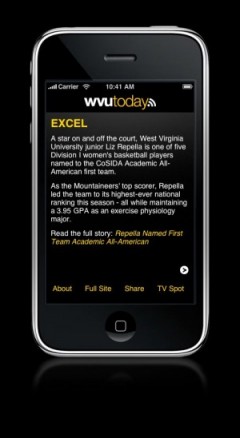
The QR code ended up leading to the WVUToday mobile experience site as seen here in examples from the iPhone version. There are a lot more examples on the Tournament Campaign page on the WVU University Relations site. There was also a generic version of the site for devices that didn’t support all the fancy JavaScript and CSS. The point of the site was to expand on five of the words featured in the other pieces by offering a related story from our news site.
The site uses jQTouch for all the of the dynamic interaction. I think it’s pretty cool how you swipe through the “cards” to access more content and then tapping a card will flip to give you a story that’s an example of the theme. I did this part of the campaign myself and it took about four days to work through all the issues. This is also the project on which I learned the importance of testing on a real device and not just a simulator. The target areas for the “clicks” were too small because I had used the tiny cursor as opposed to my fat fingers during testing. Luckily we realized that before going into production with it.
If you’re on an iPhone try saving the site to your homescreen. I think it makes for a better experience and offers a cool native app-like feature, a startup screen.
Tracking the QR Code Usage
In order to track the usage of the QR code we used Galvanize. Galvanize is a PHP class that allows you to track clicks with Google Analytics without using JavaScript. So what we did was encode the unique address http://wvutoday.wvu.edu/qr/ in the QR code. This address was just a PHP script that used Galvanize to record the pageview and then would redirect the user to the real page for the campaign. It made it very easy for us to track usage via Google Analytics and for everyone on the team to get access to the data.
The Results
Regarding expected results I tried to be conservative and had only hoped for a minimum of 100 visits via the QR code. We had about 60 total. A few things that I don’t know about the QR codes is how prominent any of the pieces were or how many people really got a chance to see them.
The Future
We will continue to use QR codes. We’ve already used them for another event and obviously we will use them to advertise our regular mobile site. I think the most benefit for QR codes will come from advertising services on campus. For example, a QR code to get the dining hall menu or, my tried and true example, a QR code to show the time when the bus will arrive. There are some really good ideas in that Brand Manager’s Notebook post as well. Again, the notion of context will drive adoption and use. Is there a place for QR codes in marketing campaigns? Definitely. If you’re putting a URL on your printed pieces or billboards why not supplement that with a QR code as well? You don’t necessarily have to have a mobile-optimized site behind it and it makes it just that much easier for users to access/bookmark content.
Hopefully this gives you some ideas on how you can use QR codes in the future. Are you using them already? Drop me a line in the comments.
This is just a general housekeeping update. Because of a trademark issue with the address I have for the current wiki I’m need to move the documentation to a new address. I’m leaving up the old wiki for a few more weeks but the new wiki can be found at http://mobilewebosp.pbworks.com/. Same content, same look and feel, just a different address.
And sorry for the lack of content here. Between vacations in June and then a July filled with troubleshooting problems with our CMS I haven’t been thinking about mobile much. New posts should start trickling out shortly.
Anything in particular you want me to address? Drop a line in the comments.