Last week, Jason Grigsby (@grigs) posted a thought-provoking article entitled On Mobile Context. It’s got a ton of links, a nice video, and plenty of good comments all focused on context and what it may or may not mean for mobile. I’ve discussed context before in this blog as well.

Jason’s primary thesis, as I understood it and how I chose to respond to it at least, is that their are a number of people arguing against context but, as much as he can see their points, he finds himself feeling that there is something context-y when those same folks say, essentially, ”if there’s no context then there’s no separate mobile web either.” It’s this conflict of feelings that brought about his post.

Defining Context (the traditional way)

I’m going to take a page from my old high school papers where I tried to fill-up a few lines by covering the definition of a word:

context is the set of circumstances or facts that surround a particular event, situation, etc. [source]

Bringing that to mobile, it basically translates to ”your current situation will have an effect on how you or why you use mobile.” I’ve primarily focused on thinking of context from a “use case” perspective. I’m starting to think that that is too narrow of a definition of context. Essentially it’s allowing environment to be too much of a driver for the thinking around context.

Context is Not About Environment

Developers and designers are not clairvoyant. We can’t possibly know every environment a user can be in and intelligently design for these environments and use cases. Nor should we attempt to fake clairvoyance. We can’t guess for the user the content they’d like to see based on environmental factors we could detect. We’d spend our time spinning our wheels on something that probably doesn’t even matter. When 30% of smartphone users use the phone from their couch while watching TV [source] the primacy of an “on the move,” environment-based context go out the window.

That being said, I do believe in a mobile context…

Context is About Our Relationship With Our Mobile Devices

Mobile is defined by being personal. Completely, unadulterated, totally, never-out-of-reach personal. So personal that 83% of millennials and 68% of Gen X’ers (full disclosure: me) sleep with phones within arms reach. [source]

To me that’s the ultimate context of mobile. A mobile device is an extension of you. It’s what information you want when you want it. It’s your thoughts and feelings shared with whom you want when you want. It’s what you want do to when you want to do it.

With mobile, if you have a need, almost any need, then you can address it. Now.

And that’s all because of the characteristics of the device (e.g. touch, customization, size, weight, networking, cameras, etc.) and it’s those characteristics that I think end up properly setting our mobile context. The best camera/browser/search tool/map/etc. is the one you have with you.

What This Means for Mobile Web

The challenge that’s out there for us now is not ”How do we figure out some environment-based context and let that inform the experience (e.g. traveling in a car)?” but instead, ”How do we make the experience we want to deliver via this little bit of glass and plastic personal? How do we get our content to relate to the user in a more useful, one-on-one way as defined by the user?

It’s, ultimately, a re-imagining of how our content fits our users needs. Just think about what Mobile First really implies. ”What tasks make sense to the user?” ”What does the user want?” ”What is going to be most relatable to the user?” All of these things are focused on the personal nature of the experience.

The current mobile web, or rather the predominance of our implementations, is, quite frankly, legacy. For the most part the browser can almost be considered Mac OS X’s “classic mode” for our devices. As someone who loves mobile web development that sounds depressing. But the browser almost seems like shim to get users to all the crude bullhorn-like “talk at you” content. Fairly useful but ultimately not the best.

These “classic mode” and classic web implementations aren’t going to go away anytime soon. There’s just way too much content out there and we have to find a bridge. That little search box in the browser can be a serious pain in the arse ;) The good news for us is that their is inertia in this mass of existing content. And it’s this inertia that will give mobile web developers the time to sort out how to make the best use of mobile’s special capabilities. To make mobile web experiences personal.

Also, from Jason’s original blog post came a nice, short presentation from Dave Mulder (@muldster) that does a good job of mixing both my arguments as well as Jason’s. It’s a tad more concise than my blog post
This article was posted

I can be a bit of a web analytics geek. I check the stats for my website multiple times a day. The thing is, I tend not to dig too deeply into those daily analytics. My multiple times a day ritual with Google Analytics seems to involve these five views:

  • The main dashboard showing total page views, total visits, and top content for the day,
  • Referring Sites,
  • Keywords,
  • Map Overlay,
  • and Service Providers.

That’s it. I always have to go through the annoying step of selecting today since it’s not shown by default, then I’m never sure how much lag their is to the data collection, and, finally, the rest of the interface is overkill and overwhelming for my day-to-day needs.

Introducing Gaug.es

Gaug.es (@gaugesapp) is a service developed by Ordered List to provide very simple and real-time analytics for your site. When I say real-time I mean a lag of like a second between a page load and that visit showing up in Gaug.es. It almost feels instantaneous. As the guys behind it say, it’s “the basics, done right.”

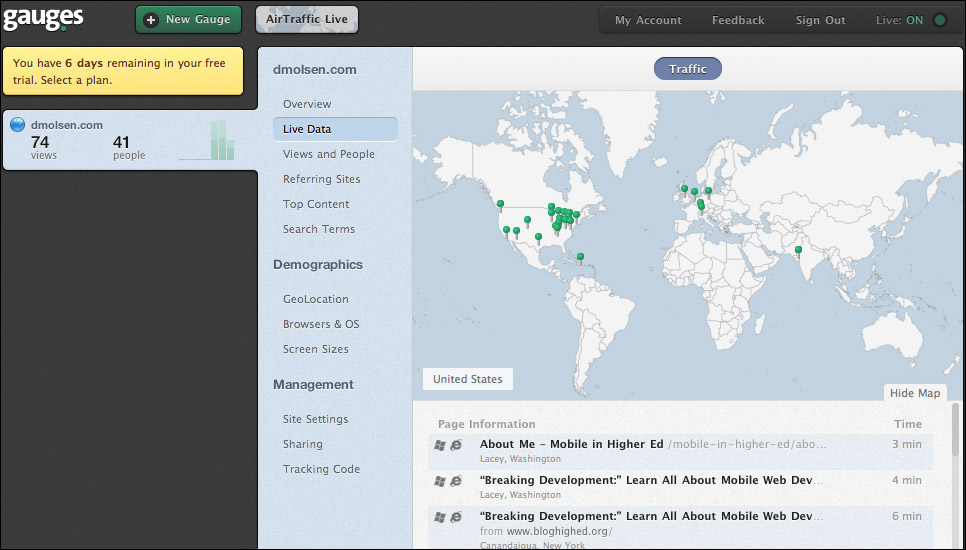
The main screen:

Screenshot of the Gauges Dashboard

As you can see, not a whole lot of data to share but the data they do show is well-organized.

The Good

So the good for me…

  • The whole point of the service is to show you statistics for today. So no modifying a timeline to get to the data I want most.
  • The content I use regularly (page views, visits, top content by title, location, referrers, and search terms) are tracked by the service. They also track browsers, OS, and screen sizes but that doesn’t matter to me.
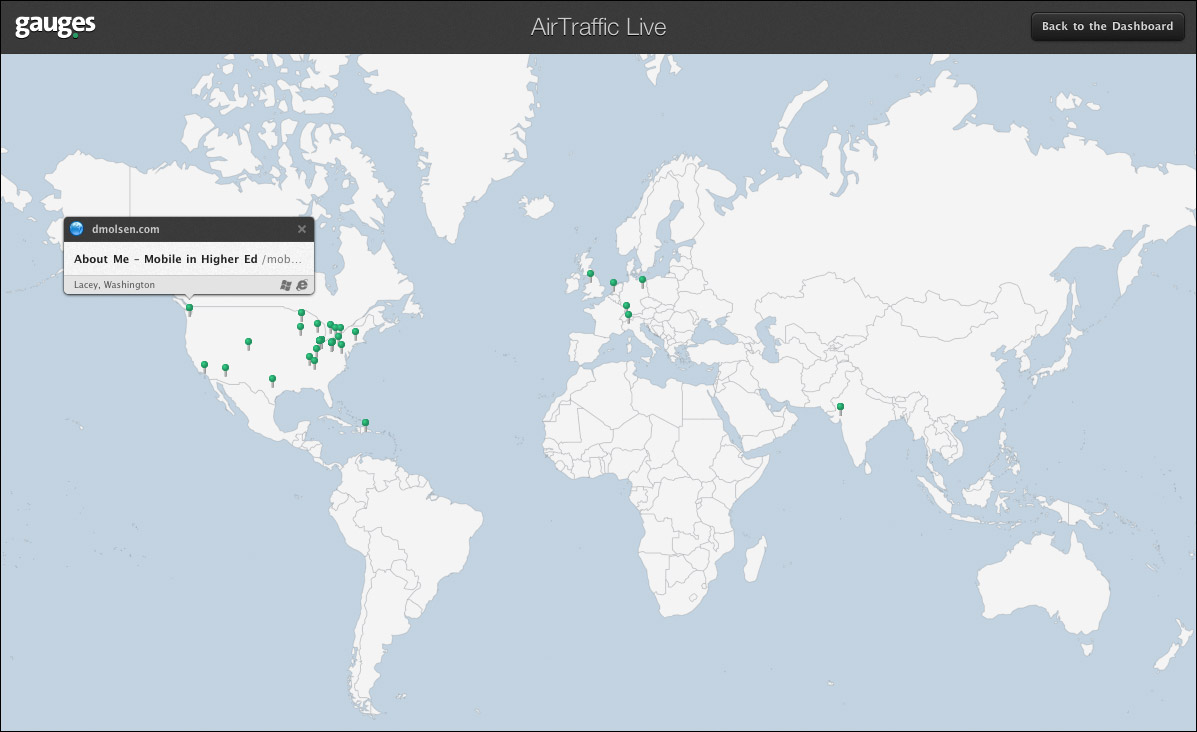
  • AirTraffic Live (screenshot below) is very cool. By leaving a small window open in the top-left of my screen I can watch traffic as people hit the site.
  • The WordPress plug-in makes it very easy to quickly integrate into your site. I had Gaug.es implemented on my site in a few minutes. Their is also a dead simple JavaScript implementation a la Google Analytics.
  • As noted earlier, it has a very simple but good looking interface.
  • Finally, Gaug.es offers a free, one week trial of their best plan. But even after the trial it’s still cheap with plans ranging from $6 to $48 per month.

Here is a screenshot of AirTraffic Live which is one of the coolest features of Gaug.es:

Screenshot of the AirTraffic Live view of data

The Not So Good

But every product has its flaws…

  • The big one for me is that it’s not optimized for mobile. There seems to have been some attempt done to make it mobile-friendly but it feels clunky and bolted on. For a service focused on real-time numbers, being able to check those real-time numbers from anywhere and at anytime seems a no-brainer. The good news is that the team is already working on making it more mobile-friendly.
  • The lack of service provider information. If you’ve played with that particular bit of data in Google Analytics (in the old version it’s under Visitors > Network Properties) you know it can provide an almost scary, detailed view of your users (e.g. you can see that someone came from Apple and, using Advanced Segments, tell how that user used your site). I’m not sure the Gaug.es team could actually pull this one off but it’d be great to see.
  • Search terms aren’t integrated into the live view like referrals are. If you get a visit from a referral you can see right-away what it was. If you get a visit from a search term there’s not way to see the relationship. This too is supposed to be addressed. Search also doesn’t get a breakdown by day like some of the other views.

Overall Impression

It’s still early days for the product but it’s already quite good. If they get these other issues knocked off I think they’ll be set. For me, it doesn’t have to be real-time Google Analytics, just real-time basic analytics. In fact, I’m still using Google Analytics on this site along with Gaug.es.

I can totally see using Gaug.es to help monitor the launch of web-based campaigns where we use social media and other tools to advertise. We’d be able to quickly see the effectiveness of these outlets and adjust accordingly.

Gaug.es is another tool in the arsenal to help schools to make effective decisions about their web content in real-time.

This article was posted

Every year I get to go to one conference. Last year I attended my first “industry” conference by going to Design for Mobile. This year I’ve made a similar decision and I’ll be attending Breaking Development. The conference description:

Breaking Development focuses on new, emerging techniques for web development and design for mobile devices. Our speakers are hand-picked to make sure you get challenging, well-delivered talks from a variety of different perspectives.

While I will be missing out on a good time and good info at a conference like HighEdWeb I’m excited to once again focus on mobile & only mobile. Two of the great features of the Breaking Development conference are the small crowd (attendance capped at 250) and a who’s who line-up of approachable and knowledgeable speakers. If it’s anything like Design for Mobile last year I expect that you could make some useful connections with other attendees and the speakers as well as have your brain melted by the talks.

The kicker is that if you sign-up before July 25th you’ll save $200 on registration. So if you’re interested make sure you get permission and register quickly.

If you’re going to the conference drop a line in the comments. Maybe we can get a higher ed meet-up together to share notes and best practices.

This article was posted

A cool new job just opened up at West Virginia University in support of the Mobile Main Street Project. From the position description:

This position provides development and deployment of media-based web, mobile and tablet applications using the latest technologies, including PHP, JQuery, HTML5, and CSS3. Incumbent is responsible for the development of an open-source media publishing system, and creating innovative location-based media services. Will also coordinate a mobile initiative region wide and deploy applications in selected communities.

Knowing the people behind the project I think this job could be really fun for someone. There is definitely an opportunity to put your stamp on a project. Morgantown is a great place to live and West Virginia is very welcoming so, even if you’re out-of-state, consider the job.

Interested? Learn more and apply now.

This article was posted