I’ve updated my higher ed mobile directory with 63 new websites. Hopefully these continue to be valuable to folks as they review their options for mobile content and mobile solutions. One interesting data point from this last batch of sites is that 31.7% of the newly added sites used jQuery Mobile. Another interesting point is that, of 1,535 institutions that didn’t have a central mobile website in June 2011, only 63 institutions, or 4.1%, added a mobile website between June and mid-October 2011. It appears that ~18% of institutions now have a central mobile website. I can’t decide if 1 in 5 institutions having a mobile site is a sign of progress or if 4 out of 5 schools are lagging behind.
I’ve added the new sites to this post for your convenience. The full list now contains 330 higher ed mobile websites. If you’re interested in how I define mobile websites for the purposes of adding new sites or how I go about finding these sites please check out my methodology.
An updated version of my talk, ”Developing a Progressive Mobile Strategy,” that I gave at the Breaking Development conference this morning is now on SlideShare. It includes notes for each slide and hopefully should be readable and understandable without them. If you have questions or issues feel free to drop a note in the comments section.
I’ll be making two appearances in the next month or so. One is online and the other one will be in person.
Higher Ed Live
This Sunday, August 14th, at 7pm Eastern I’ll be appearing on the Higher Ed Live web show to talk mobile strategy with Seth Odell (@sethodell). I’ve been in training for the last few weeks so I’m hoping I can keep up with Mr. High Energy. Folks can contribute to the show by taking to Twitter with the hashtag #higheredlive. As with any of the Higher Ed Live shows it promises to be a good time. I’ll even keep the hat off for this show.
Breaking Development
I’m really excited to be able to share that I will be speaking this September at the Breaking Development conference as part of their Freshly Squeezed Mobile series. Here’s the description for my talk entitled ”Developing a Progressive Mobile Strategy.”
A common refrain from both management and clients alike today is, “We need an app…” Unfortunately, over the long-term, mobile solutions for you or your clients’ organizations will need to be more diversified than a single app. From optimizing current web content to developing unique experiences mobile will touch, and possibly transform, your entire enterprise. Not only will your interactions with your customers be affected by the rapid adoption of smartphones but also your workforce and business processes. Combining lessons learned at a large, land-grant university as well as the latest statistics on mobile we’ll review why you need a cross-audience, cross-content, and cross-platform mobile strategy, what one is all about, and how it’ll help you prioritize your mobile solutions.
The rest of the speakers & topics at the conference make up a hell of a line-up. As much as I’m looking forward to giving the talk I’m really looking forward to meeting the other attendees. If you’re going make sure to drop a line in the comments.
Last week I posted a survey where I asked, ”How would you use your phone to find movie times?” Over a hundred folks responded to my quick, four question survey. Surprisingly, only two people actually asked me what I was looking for.
The Hypothesis
In my recent talk, Developing a Progressive Mobile Strategy, I discussed why a mobile strategy, especially for higher education, has to be about more than just an app. One of the things I focused on was audience and, specifically, the importance of the urgent user (i.e. someone trying to find information to answer an immediate need).
For the urgent user there are essentially three ways to access content from their mobile device (leaving aside calling someone or using text messaging):
Having an app already installed to address their needs.
Going to an app store and downloading an app to address their needs.
Going to a website to address their needs.
It’s the second option that I was really curious about. I wanted to know if it was a truly viable option for the urgent user. If not, then option three becomes that much more important. To me option two is not viable for several reasons but, being a mobile web-focused guy, it wouldn’t have surprised me to be wrong based on my biases.
Colleges without [an app] will miss reaching a critical group of tech-savvy users who “10 times out of 10″ prefer downloading an application over using a mobile Web site, which serves the “everyone–else bracket,” [Kayvon Beykpour (@kayvz), vice president of Blackboard Mobile] says.
My problem with this quote is not that I think people don’t like apps or that, somehow, mobile web can or will be all that a school needs. I’ve been very clear that I don’t think we’re in a mobile web versus native situation anymore. My problem is that it sort of dismisses how users actually use their devices to find information. That platform trumps actual usefulness. Not every piece of content you have that a user may need will fit in an app and not everyone will have the app when they have a need. Mobile-optimized web content doesn’t serve “everyone else,” it serves everyone.
The purpose of the survey, therefore, was to see where users, in an urgent need setting, turned to find information and how their interest in a topic might affect the solution they chose.
The Scenario
For the survey I created a pretty simple “urgent need” scenario that I expect most everyone can relate to. It definitely has both app and mobile-optimized solutions to it that the regular person should be aware of. This is similar to the piles of content that universities already have online that users are probably aware of.
You’re out with friends having a lovely dinner when someone suggests going to see a movie. How would you go about finding what movies showing and what time movies are playing at nearby movie theaters?
Roughly 100 people submitted responses. I only advertised the survey on Twitter and my blog so I guess the caveat is that the results could be skewed towards slightly more technical users. That being said the numbers worked out roughly the way I expected.
Most Used: App or Mobile Web?
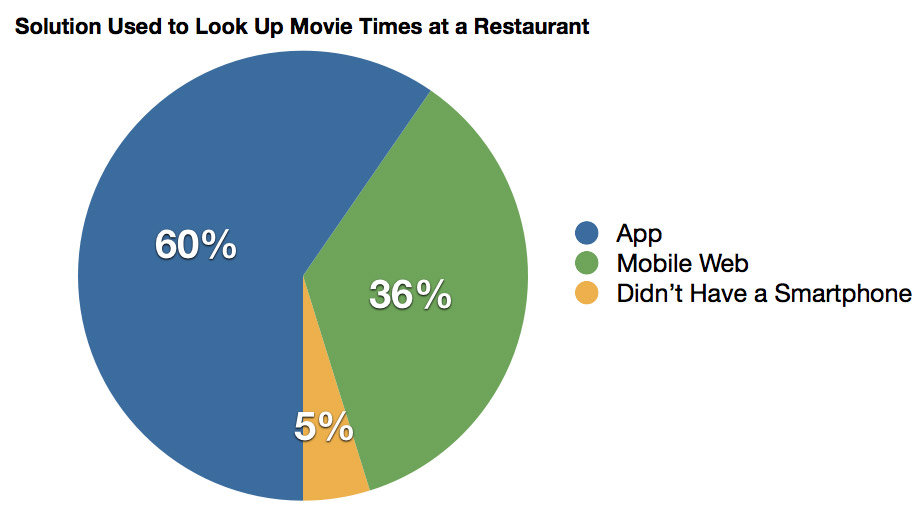
The chart…
60% answered that they would use an app to answer their need but a sizable chunk, 36%, would use the mobile web to answer this particular need. When one out of every three folks feel comfortable going to the mobile web to answer a need then it shows it needs to be a part of a mobile strategy alongside app solutions.
How Many Would Download an App?
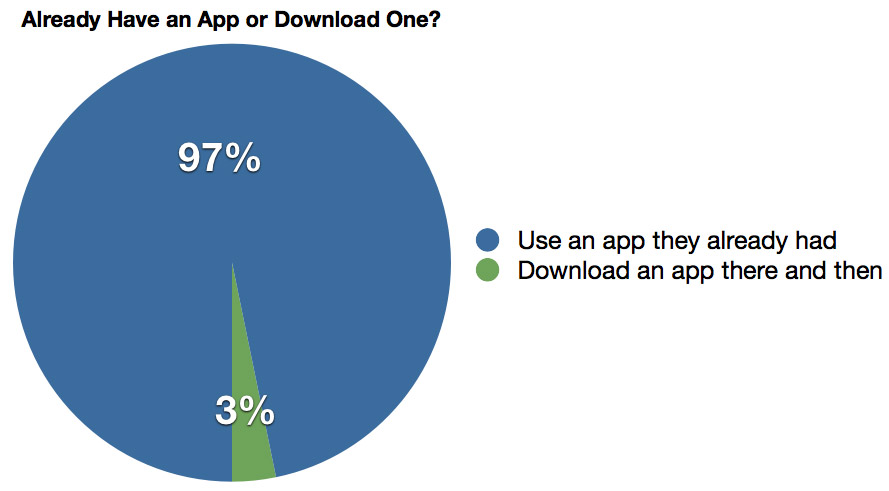
The chart…
This is the one actually surprised me. Only two people answered that they would download an app there and then in the restaurant. It’s not that I expected a huge number of people to do this but I would have guessed more than 2% of all users would go that route. I think it hints at how and when users “discover” apps though…
When Did a User Download the App?
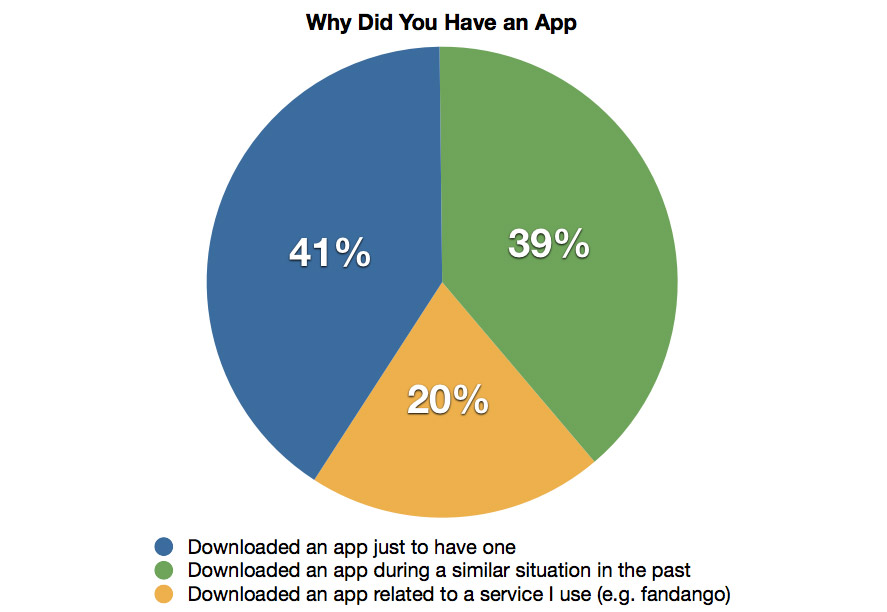
The chart…
This graph leaves me a bit confused. If, when not having an app, only 2% of respondents say they would download one then how could 39% of people download an app in a similar situation. The 39% seems a bit high. Maybe this is a common problem so those folks who use apps would have gotten it out of the way early? Maybe the question was poorly worded because I included the qualifier “similar?”
Does Interest in the Topic Affect App versus Mobile Web Solution Selection?
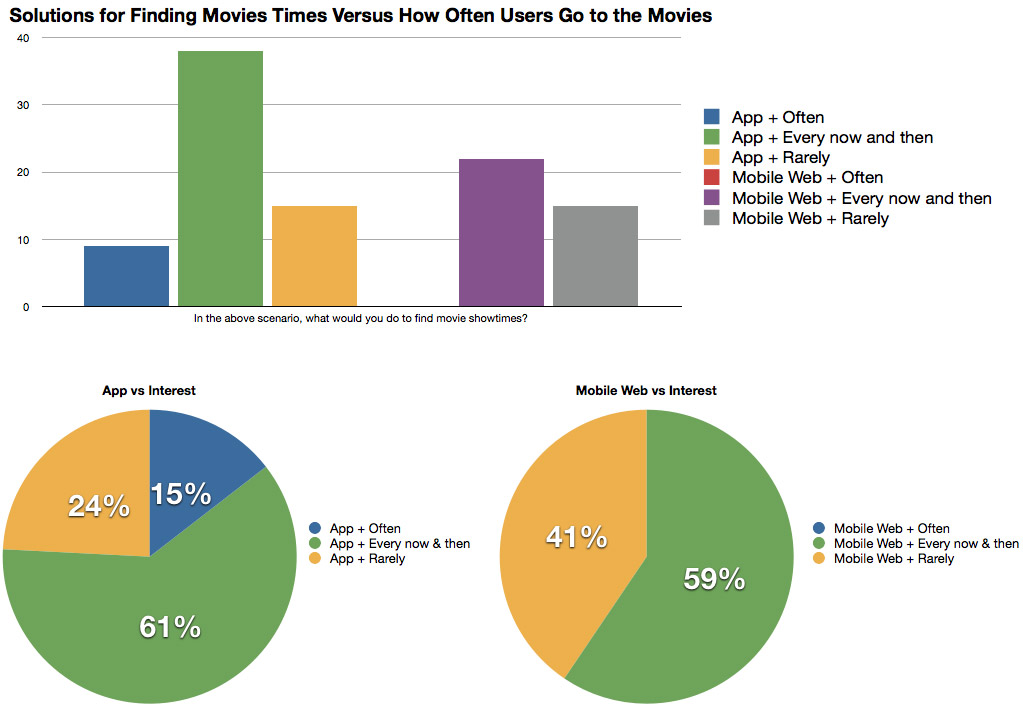
I was also curious if interest in the topic would affect the solution chosen. It seems that this should be a no brainer and it appears that it sort of is.
The more likely a user was to attend the movies the more likely they’d have an app. Of the nine folks who had a smartphone and said they went to the movies often, all nine had an app. No one who chose mobile web self-identified as going to the movies often. Also, mobile web users were more evenly split between attending movies “every now and then” and “rarely” with the same number of mobile web and app users saying they rarely go to the movies.
The Conclusion
I think this survey only scratched the surface in regards to the decision-making process of how users with an urgent need would find information. I kept it short in the hopes of getting more submissions. For example, I didn’t ask any questions in regards to why a user would choose mobile web (e.g. “the app you wanted isn’t available for your OS?”) or why a user might not choose to download an app (e.g. “did length of download times or needing to search an app store stop you?”). I don’t think that invalidates the results but, obviously, more study could be done.
What I think the results do show, though, is that their are indeed two viable avenues that users will take to find your information. The more interested they are in a topic or bit of content the more likely they’ll try to find an app before their need ever arises but, when the need arises, if they don’t have an app they’re probably defaulting to the web.
For most schools learning about the program the first question will probably be, “How do we get that badge?” (With the second question, “Is it free?” ,quickly following. The answer is yes.) To get the badge a school must fill out the foursquare for Universities sign-up form. If you’re already in the university program I’m not sure if you have to fill it out again or not.
As more and more smartphones hit campus the ability for students to discover your events, offices, and deals while they’re out and about is going to skyrocket. foursquare provides a great and fun avenue to share information based on location with students. If you’re so inclined, and I think it’s one of the most powerful and useful tools of foursquare, the API can open up a whole host of possibilities.
Student Ambassador Program
If you know of a student on your campus that is totally into foursquare and can be an asset in helping populate foursquare with your information then tell them to check out the re-launched Student Ambassador Program. Collateral and a connected extra hand can always be helpful.
Keeping Up with Future foursquare Updates
Obviously you can follow the foursquare blog for future updates but there are at least two other avenues as well. There is the @4sqonCampus twitter account and you can follow Anna Frankel (@af), one of the campus marketing folks at foursquare, as well. If you want to know more about what is involved with the new program I’d definitely encourage you to ask either of those two accounts. I’ve been pleasantly surprised by how much they really want to help higher ed do cool things with their technology.
I’m excited by what schools will be able to deliver with foursquare on their campuses. The new custom badge program shows that foursquare recognizes both the economics of higher education by offering the badge for free but also knowing we can help push the envelope a bit as well if they can engage and educate us.