The list of open source mobile web frameworks targeting higher education continues to grow. By my count we’re up to five that I’m aware of with yet another project in the process of starting up. If you’re starting to think about going down the mobile web path as part of the mobile strategy for your institution and you’re interested in an open source solution here are your options:
Kurogo Mobile Framework – Kurogo is the latest higher ed mobile web framework to drop. It was developed by the folks who brought you the original MIT framework. They’ve done a great job of learning from the original project and pushing a revolutionary release as opposed to something more evolutionary like Mobile Web OSP. Looks good graphically, has a comprehensive set of docs and a great team supporting it.
Molly – If you’re interested in a quality framework but want something that uses Django & Python then check out Molly. Under very active development by the folks at the University of Oxford it has some really cool features like integration with Sakai.
UCLA Mobile Web Framework – I haven’t tried the UCLA Mobile Web Framework out at all so there’s not much I can say about it from personal experience. It does power the UCLA mobile site so you can check that out. It’s PHP based and has a fair bit of documentation. You need to contact the folks at UCLA to get access to the code though.
MIT Mobile Web – The original MIT Mobile Web framework is still out there if you’re interested in using that. Frankly, I think it’d be best to skip this framework and just go to Kurogo if the MIT style interests you.
Mobile Web OSP – And obviously there is the mobile web framework that I support, Mobile Web OSP. It hasn’t been under active development for a little bit as I’ve been tied up in other projects but I think it does provide a decent base to start from as you develop your mobile website.
And the latest project getting started comes from Jasig with their uMobile initiative. I’m unfamiliar with Jasig but they’re the community behind uP0rtal. I assume this would be a Java-based framework that has hooks into uPortal but that’s just a guess. It’s just getting started so now is the time to get in on the ground floor for that project.
To sum up, there are a lot of great options out there. The time is perfect to try out a framework and see if it works for your institution ahead of the start of school in the fall.
All this week EDUCAUSE is hosting what they term a 5-day sprint on the very large topic of mobile computing. Each day is built around a specific mobile computing topic and includes a free webinar. Unfortunately I believe most of the webinars are “sold out” but EDUCAUSE is posting them for free very quickly after the events. More info on the sprint is available in EDUCAUSE’s Sprint 101 page. There is a nice recap of yesterday’s events. One of the more interesting opportunities for discussion during the event is the IdeaScale forum. And you can also follow on Twitter by following the hashtag #EDUsprint.
If you’re interested in mobile in higher ed I hope you can join in.
For the last few weeks I’ve my head down working on a set of surprisingly complicated mobile projects. They launch tomorrow so I won’t be able to attend this webinar but I wanted to pass it along to folks following this blog. These folks presented a webinar a while back and, while I also missed out on watching it then, the slidedeck was really good so I’m sure you’ll get a lot out of it. So if you’re on the East Coast schedule your lunch break around this one. On the West Coast? Why don’t you ease into the day by watching it.
The College of William & Mary and mStoner will jointly present Mobile Trends and Opportunities on Tuesday, March 1, 2011 at 12:30PM (ET).
This webinar will be led by Doug Gapinski (@thedougco), a creative director at mStoner, Susan T. Evans (@susantevans), director of creative services at William & Mary, and Tiffany Broadbent (@tb623), web programmer at William & Mary. The online event is free but registration is required at https://www3.gotomeeting.com/register/340142510
Join us for a session exploring the trends and challenges associated with mobile delivery for education institutions today. Tune in if you have any or all of the following on your mind:
What can mobile site delivery do for your institution?
Which audiences are most likely to engage with you this way, and how can you meet their needs?
What are the trends in mobile delivery for .edu sites, and how can your institution get started?
After registering you will receive a confirmation email containing information about joining the Webinar.
Posts will pick up towards the end of the week as I go into the technical details behind those projects that are launching tomorrow. Got some neat tricks coming.
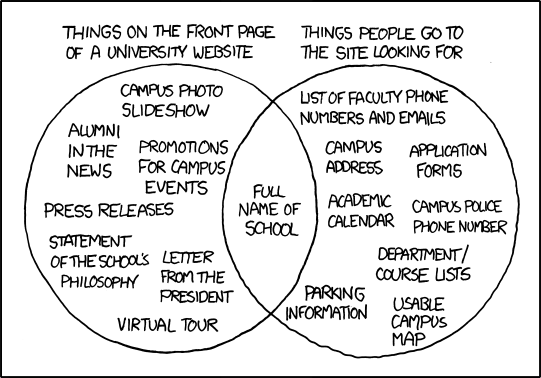
Ah, the infamous University Website comic from xkcd. I saw this posted in a forum last week and as I was looking at the right side of the Venn diagram I thought, ”That looks like a lot of the current and planned content for our mobile site.” I think the only thing we don’t have are the admissions application. And that thought got me to thinking about Luke Wroblewski’s (@lukew) concept of Mobile First. The key point to me, and how it relates to the Venn diagram, is that by designing mobile first you have to ”focus on only the most important data and actions in an application.” This focus, by removing unnecessary fluff and cruft to fit in the constraints of both the device real estate as well as network limitations, helps craft a better and more useful user experience. I think it’s a really interesting way to approach design and maybe we need more of that in higher ed. Mobile sites in higher ed will probably reflect more closely the needs of most of the current student population than the university home pages will… and sadly those sites will be buried. Will university mobile sites one day grow up and be the portals to information that students have always said they wanted on the desktop?
Note: I’m well aware of the political and audience issues affecting university home pages having been through the redesign process two times now. A boy can dream though.
For some time I’ve been interested in getting a snapshot of the state of the technical implementations of mobile websites in higher education. Last week I tried to pull some numbers together on that topic for my talk on HigherEd Live. If you’re interested in more “management”-type questions Karine Joly (@karinejoly) is currently running a survey to get answers to those. Take some time to help the rest of higher ed out by answering a few questions. It doesn’t matter if you have a mobile higher ed site or not!
The Data
For this survey I reviewed institutional mobile websites for schools listed in my Higher Ed Mobile Directory. By ”institutional” I mean that I ruled out purely marketing-focused sites like the WVU Today Mobile Experience and library mobile sites. Institutional mobile websites are meant to provide services to an entire campus and not just a small segment of the population. To help populate the Higher Ed Mobile Directory I used a list of US-based schools granting bachelor or advanced degrees and ran an automated check of popular mobile web addresses against it. Because of this my directory is seriously lacking in international schools. So take this survey as a primarily US-centric view of the mobile higher ed world. For the international folks checking this out… sorry.
Time to run through the questions I wanted answered…
How many institutional mobile websites are there and how does that number compare to the overall number of higher ed websites?
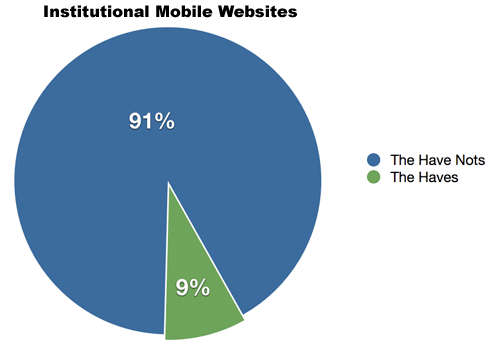
Based on my initial list of 1,789 schools it looks like only 160 or 9% of schools have an institutional mobile website. Mark Greenfield (@markgr) pointed me at the Carnegie Classification which currently tallies a whopping 4,600+ higher ed institutions. Sadly, it doesn’t look like I can easily get web addresses for all of them to test against.
What solutions did schools use to develop their mobile websites?
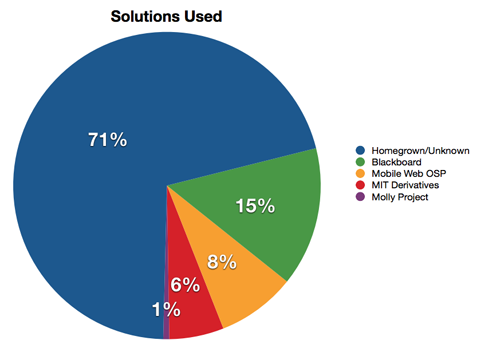
This is a tricky number to come up with because I don’t really know what they used. Because of that there is a very large “Homegrown/Unknown” bucket with 71% of the total. I do think it’s fair to say that those schools attempting to get a mobile presence setup are going on their own. Blackboard was the most obvious vendor product and the largest single solution used with 15% of the total. Mobile Web OSP was the second most used solution at 8% and MIT derivatives other than Mobile Web OSP rounded out at 6%.
One interesting thing to note about Blackboard and the mobile web is that a school like Stanford has a Blackboard-based mobile site and a separate, homegrown mobile website. The Stanford home page redirects to the latter so it’s not like it’s some dead, forgotten website.
What are the popular types of content?
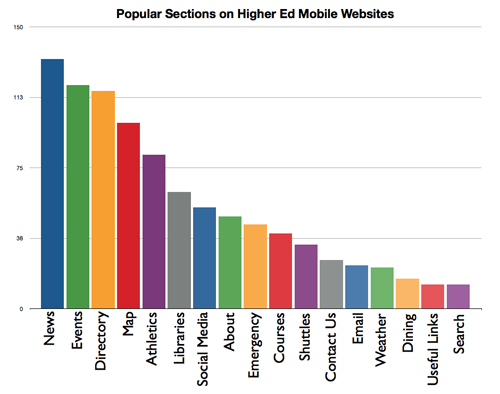
Looking at the results I can’t say I’m too surprised. News (on 87% if the schools surveyed), events (78%), and directory (76%) are probably the easiest sections to get a mobile version up and running for. I’m a little bit disappointed by the showing for maps (65%). If you’re going to develop a mobile solution a good map is a must. I do understand the difficulty in getting data but mobile is all about location. A few things that I expect to work into our own mobile site based on the results are: a note about our text alert system on our mobile emergency page, higher visibility for links to our email platforms, better search feature, and contact us and request info forms. All are low on the list but I think they do offer real value. This chart shows all sections that showed up on 10 or more higher ed mobile websites.
What web address should we use?
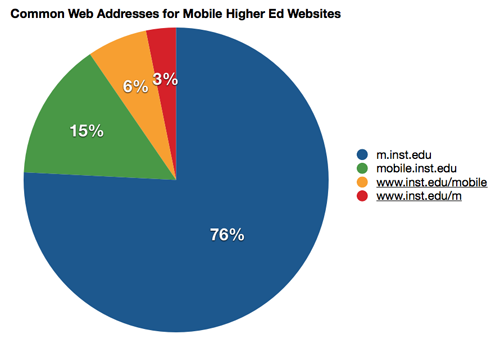
I would actually suggest to use all of these. At WVU we don’t but I’m going to remedy that. Also, a few schools answer to multiple hostnames but I just included the first one I found.
For design layout which is more popular, grid or list?
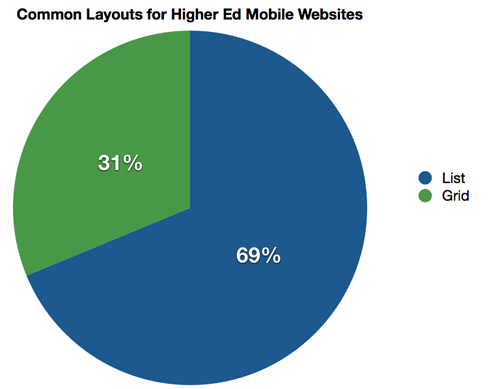
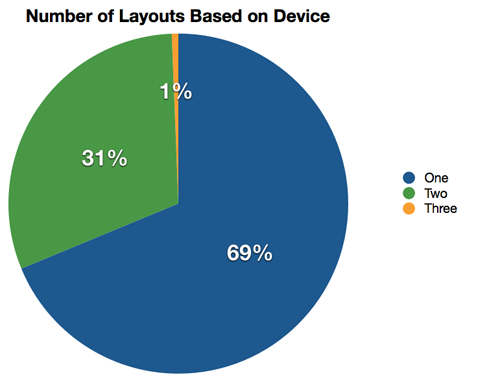
There are basically two design layouts at this point in the higher ed world. The grid (31%) (e.g. like the iPhone homescreen) and the list (69%) where items are just stacked on top of one another. I personally prefer the grid layout. Shocker, I know.
How many device classes do these sites support?
One of the main features of Mobile Web OSP, Molly Project, and the MIT derivative frameworks is support to give custom layouts based on requesting device. In order to organize these layouts we refer to them as device classes (e.g. iPhone and Android in one device class and the Motorola RAZR and other features phones in another). I’m a little disappointed that their aren’t more schools attempting to support at least two device classes (31%) but I guess that’s understandable.
By the way, the most obvious single layout was one for the iPhone at 320px. Wish I had a separate question that categorized the designs I saw.
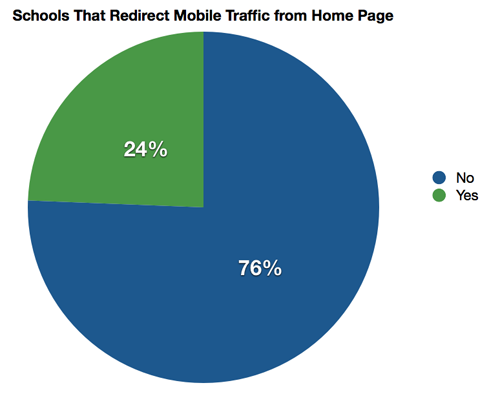
Do schools redirect mobile home page traffic to their mobile site?
I really think schools should do this. For the casual user trying to find mobile information their first stop is going to be the home page. Make it blindingly obvious where they can get mobile-optimized information by redirecting them. It’ll be your biggest form of advertising for your mobile site. Always give them an opt out though.
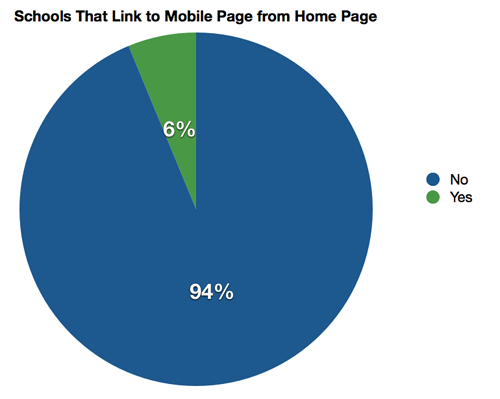
Do schools provide a link to the mobile page on the home page?
We don’t do this but I think it may be time to change that up. I was surprised by how many did.
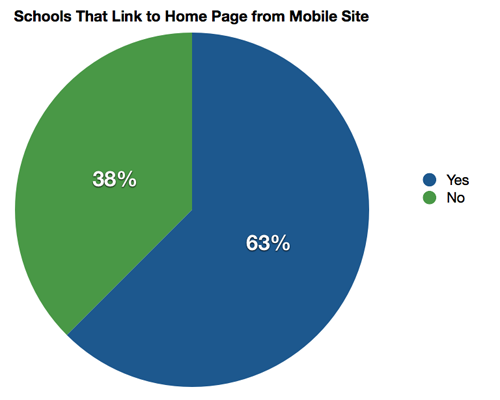
Do schools provide a link from their mobile page to the home page?
This is a no brainer to do though it’s surprising only 63% do so…
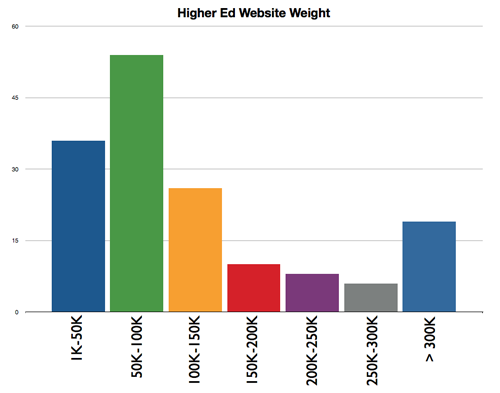
How “heavy” are higher ed mobile websites?
I was curious to see what how well schools had optimized the main landing page of their mobile sites. With JavaScript mobile-focused libraries on the way (e.g. jQuery Mobile) I would expect the weight of these sites to increase substantially over the next year. For example, WVU’s mobile website weight with jQuery and jQTouch is ~334K. Pretty hefty. The largest higher ed mobile site I came across was 1.9MB. The smallest was 4K. For those schools that had multiple device classes I used the heavier number. Also, you guys with Blackboard mobile websites may want to ask why jQuery is used. 89% of a typical Blackboard mobile website’s weight is simply jQuery. Those sites aren’t terribly heavy as it stands but it seems an odd inclusion.
By the way, weight isn’t the only issue when thinking about optimizing performance of a mobile website. You also have to think about how many requests are being made back to the server. If you can merge stylesheets and javascript files into bigger files you should think about it. Minify is a good project for this kind of feature. You can also embed images in CSS using data URIs instead of linking to them. Unfortunately when I did the survey I didn’t think about measuring the number of GET requests…
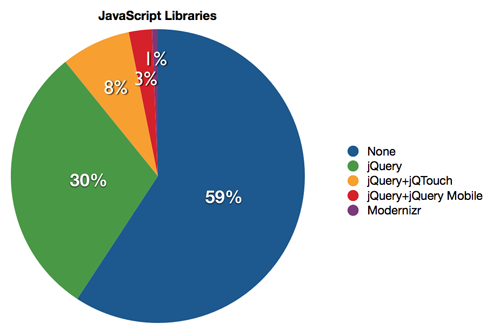
Use a JavaScript library? If so, which one?
This is a bit of a moving target with jQuery Mobile pushing towards a stable release but interesting to me nonetheless. Yes, a JavaScript library is sort of the antithesis of a lean, mean mobile site but they’ll be used more and more.
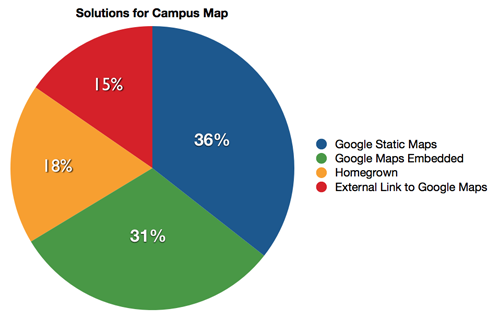
Which map solution is most popular?
I’m totally focused on the campus map. If you asked me which mobile content you should be developing I’d list campus map as #1 and trail it with a few exclamation points. Everything mobile comes back to location. I know I’m repeating myself but I figure no one has actually read this far by now.
]
What do schools used for mobile analytics?
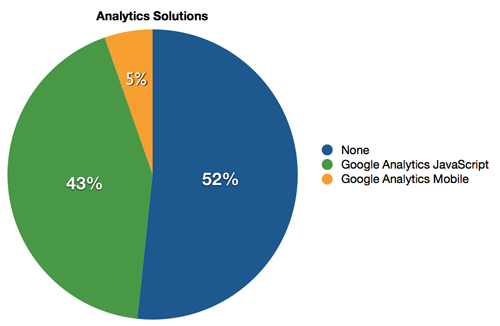
With, what I expect to be, a strong usage of Google Analytics in higher education I was curious if schools went with the mobile version or regular version of the analytics tracker. I was also curious if schools used another service. It appears that more schools don’t use a 3rd party to track their analytics for their mobile site than do use a 3rd party service. And the regular JavaScript version of Google Analytics absolutely crushes the mobile-specific version. Most of the uses of the mobile-specific version come from folks running more than one device class.
One thing to note about mobile stats, we rely on both internal stats recorded in our database for the site as well as Google Analytics. Internal stats are most accurate but don’t come with the depth of Google Analytics.
Are any schools using advanced features like geolocation?
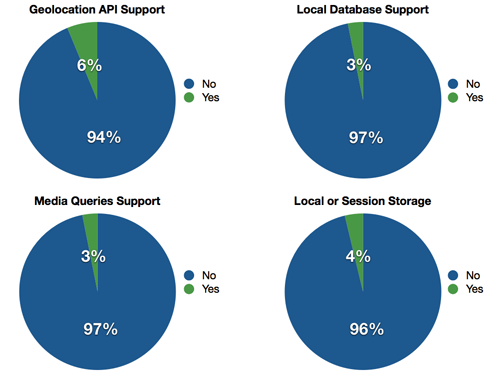
Last on my list of questions are the serious technical issues like support for the HTML Geolocation API. While geolocation has been addressed by a couple of schools things like the local database or local/session storage are schools running Mobile Web OSP 2.0. I only checked media queries for the mobile sites and not home pages. I just didn’t have the stomach to review 1,789 pages by hand though I could have spent some time and figured out an automated way to look at it.
Conclusion
Hopefully these numbers shed some light on the current state of the technical implementations of mobile websites in higher ed. It was a really tough slog to get all the data together and I don’t relish the idea of doing it again but it definitely helped me understand what might be useful to push in the future. I hope it helps you too.
 ]
]