In one of the various higher ed forums Lougan Bishop (@lougan) posted a query about QR codes (example to the right). Basically he was asking if any schools were using them and, if so, how they were using them. A number of responses came back but one of the most useful may have been from Cliff Jenkins (@cliffyballgame) who noted that you could use the URL shortener bit.ly to create and track QR code usage. This was something I already knew but figured others might find this tidbit useful as well.
Steps for Creating a bit.ly QR Code
Here are the pretty straightforward steps for creating a QR code via bit.ly
Enter in the URL you want to create a QR code for. For example I’d want one for the web address http://www.wvu.edu/
Click “Shorten”
The web address you just shortened should have been added to the list of other addresses you may have shortened
Click on the link “Info Page” for the web address
In the top right of the info page you should now see the QR code for the address you just added. If you click on the image you’ll get a slightly larger version that you then can save to your desktop to use in printed pieces or wherever.
With bit.ly you’ll get both your QR code created for you and a simple way to track the total number of uses of your QR code. If you’re using Google Analytics you may want to consider adding the appropriate campaign tracking attributes to your original web address for more robust tracking (hat tip to Michael Fienen (@fienen) for that idea).
Are You Using QR Codes?
If you’re using QR codes at your school please feel free to drop a line in the comments and share what you’re using them for. We used them in our Big East campaign last spring.
I spent some time last week updating my Higher Ed Mobile Directory. I was able to add 61 new sites bringing the list to a total of 162 higher education-focused mobile sites. Since I didn’t mark which sites were new I figured I’d make a special post so folks could more easily trawl through the new-to-the-list entries. At some point in January I’ll put together a short survey of all of the schools listed in my directory so folks can get a better idea of solutions used, design patterns, and important content to feature.
Note: these new additions are all from the US. I hope to do international schools in the near future.
This post is similar to my proposal for content adapters. It’s an attempt to get some feedback on a big-ish change to the system from interested parties. One of the features that I really like in the Harvard mobile site is the search box on the main page that allows you to quickly search across the multiple sources of data that are found on their mobile site. With the addition of the Content Adapters I think I have the basic building blocks for deploying a similar feature.
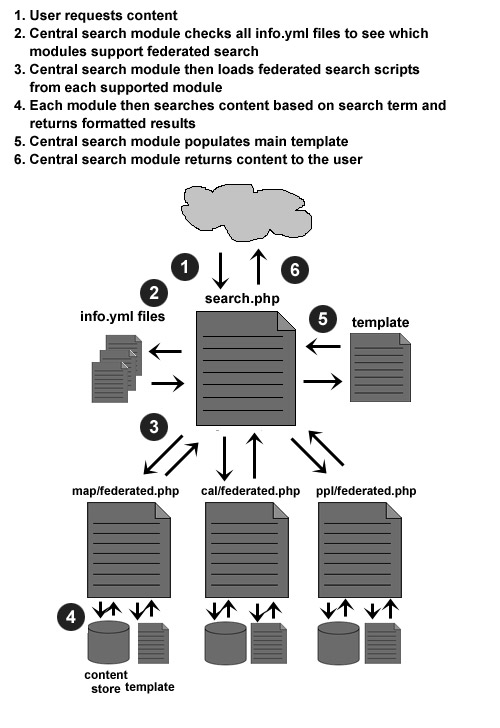
Federated search is an information retrieval technology that allows the simultaneous search of multiple searchable resources. A user makes a single query request which is distributed to the search engines participating in the federation. The federated search then aggregates the results that are received from the search engines for presentation to the user.
At the end of the day it’s a pretty straightforward concept with, what I think is, an ugly name.
How Federated Search Works
Below is a graphic showing how federated search is currently working in my local copy of Mobile Web OSP. It’s a bit pared down filesystem-wise so don’t worry about that part. Note that in Mobile Web OSP 2.5 there will now be an info.yml file to manage minor configuration options as well as identify the name and version of modules for the “easy setup” process.
Why all the checking of info.yml files? I’d like to make this set-up “turn-key” as much as possible. So basically if you create a module that supports federated search via federated.php all you have to do is add one flag to the info.yml file and you’re all set. I’m really trying to avoid a lot of cross-module configuration whenever possible. I think the performance issue of checking the file system on each request is offset by the very low usage most sites get. At some point this feature could also be updated to use a cache system.
Example Code
Here are some gists for the code behind various parts of the set-up. Hopefully it’s fairly straightforward.
And for the actual directory layout it looks like this:
map/
adapters/
federated.php
info.yml
templates/
basic/
federated.html
touch/
webkit/
search/
index.php
templates
basic/
touch/
webkit/
What Do You Think?
So I’m curious what people think. Seem like a workable solution? Would it make your lives easier? Having implemented the example I really like it but I’m sure their are still some issues to work out.
Updated January 2, 2011: The initial commits for this feature have been made. Calendar and map are the only modules supported at the moment. Quite a bit of work related to tweaking the look & feel for the set-up are still required. From the above example the info.yml file requirement has been removed and a cache mechanism for performance issues has been added.
For the last few weeks I’ve been hard at work on Mobile Web OSP 2.5. Today I committed the first of my content adapters for the system and it’s related to the calendar. While that’s been one of the big features I wanted to include based on recent conversations I’ve had I’ve also implemented some other things that folks my find interesting and that go a bit beyond what I discussed in my State of Mobile Web OSP post.
All of these changes are currently available in the master branch of the project. Because their are still some commits I haven’t made the master branch should be considered very unstable and may not work properly but hopefully there’s something there to be gleaned.
Database Support Expanded
MDB2 support has been added and the project will come with drivers for MySQL, MSSQL, and PostgreSQL. MySQL will be the only database that I actively test though. Because MDB2 doesn’t currently support SQLite3 that option is now turned off but I hope to find a solution before launching 2.5.
Device Detection & Classification Updates
The core feature of Mobile Web OSP is the ability to display content in different templates based on the type of device requesting that content. In my ”State of…” post I talked about being unsure on what I wanted to do with this future. Well, in the short term, I’ve attempted to expand the number of devices that get classified by the system as well as breaking that service out into it’s own class to hopefully make it easier to utilize and update. There are some neat functions where you can deliver tweaks in templates based on type of device as well as version.
I’ve also added a JSON-based simple API for allowing other applications on your campus to use Mobile Web OSP as a device classification service. This should lead to only needing to update one place for all your device detection and classification needs.
That being said I’m still not sure this in-system feature will last. Looking ahead the Android tablets will cause my system a few headaches.
More Granular Statistics
The internal statistics package has been upgraded to allow for more granularity in reporting devices based on the device classification class. For example, if you add special classifications for the Palm Pixi or Nokia handsets to the device detection class those devices will start to be automatically tracked in the internal stats as their own line item. Also, any new modules you may add to the system will also start tracking immediately without any changes to the databases. Note:* because of these changes access to year-over-year data goes out the window because it was such a major change. *
Google Analytics support has been updated to use the async version as well as properly tracking outgoing links, outgoing phone calls, and outgoing emails via Google Analytics Event Tracking feature. A bug with tracking clicks on the back button in WebKit templates has also been cleaned up.
Accessibility Improvements
I’ve made some accessibility improvements for the heavily-JavaScript WebKit templates using jQTouch. The improvements include better focus() support for newly loaded “pages” as well as the addition of some ARIA roles for navigation assistance. Many thanks to Dave Mulder (@davidlmulder) for the feedback/help on this very important topic. The source for jQuery Mobile was also very informative.
Module-specific Improvements
Some module-specific improvements:
Better RSS support in the News & Emergency modules including cache support through the use of Simple RSS (this may change by launch of Mobile Web OSP 2.5 as I turn the RSS reader into a content adapter as well)
A simple include file for the Emergency module so that one can quickly add a message that gets pushed to all three templates
Weather module now properly works with the new template scheme.
Module-specific JavaScript for creating new local databases on devices has been moved from a system-wide db.init.js file into the module-specific JavaScript init files.
Security
The example Apache virtualhost file has been updated to give tips on how to properly restrict web access to parts of the system that don’t need to be exposed that way.
Delivery Date?
I’ll have a better idea in early January on when this project will be delivered to the outside world. My goal is to get a new version of WVU Mobile Web rolled out before the kids come back for the Spring semester. That may be a bit ambitious as it includes quite a few sections that I need to develop from scratch. I’ll try to keep you all updated though.
Update December 28, 2010: The second content adapter for the map has been committed.
Update January 6, 2010: There’s also a new feature proposal for federated search. I’ve currently committed federated search functionality for maps and calendar.
One of the interesting things to come out of my State of Mobile Web OSP post was some comments related to how content sources can be more easily integrated into the system. For example, our set-up of Mobile Web OSP uses Google Calendar to power our calendar module. Others may have institutional systems that they’d like to access directly or through some other software’s API set-up. At the moment you’d have to rip out the guts of the calendar module to implement your own calendar source. Then, as new features are released, you might be stuck not being able to easily upgrade. With that in mind I offer here a sketch for Content Adapters.
Defining Content Adapters
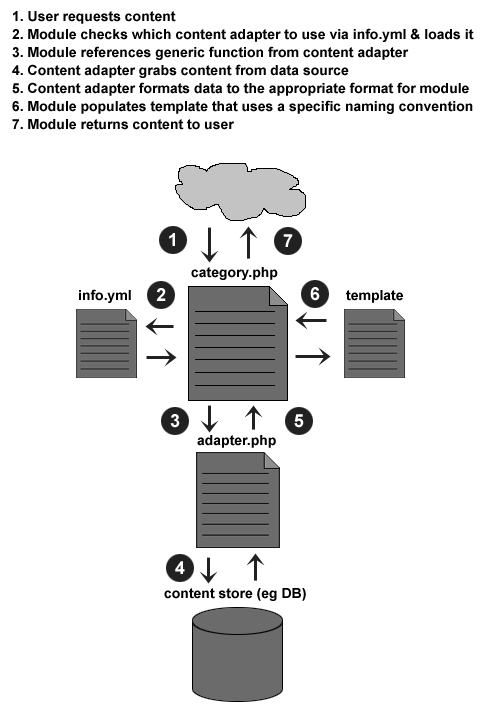
Content Adapters are a set of standard functions that can be called from a specific module. These functions then talk to the appropriate data source and then return the data from this source in an agreed upon format to be used by the templates for the module. I hope that each school will be able to develop their own Content Adapters. This should allow the core of modules as well as the templates to stay relatively intact without needing much modification.
How Content Adapters Work
Below is a graphic showing how Content Adapters work. It’s a bit pared down filesystem-wise so don’t worry about that part. Note that in Mobile Web OSP 2.5 there will now be an info.yml file to manage minor configuration options as well as identify the name and version of modules for the “easy setup” process.
Example Code
Here are some gists for the code behind various parts of the set-up. Hopefully it’s fairly straightforward.
I won’t show the template only because it’s really fugly and it should be pretty self-explanatory at this point what it’d look like.
And for the actual directory layout it looks like this:
calendar/
adapters/
google_calendar/
adapter.php
category.php
info.yml
templates/
basic/
touch/
webkit/
What Do You Think?
So I’m curious what people think. Seem like a workable solution? Would it make your lives easier? Having implemented the example I really like it but I’m sure their are still some issues to work out. It definitely forced me to DRY my code a little bit.
Update as of December 20, 2010: I’ve had zero feedback on this idea. As such I’m going to go with it and if it needs to be tweaked later hopefully I can do so.